Arc browser is shutting down on 22 December: how to move out in time and which AI browser to pick
The Browser Company is switching Arc off on 22 December 2026. On that day the browser stops working on Mac and Windows, your account is deactivated and your data is deleted within the following 30 days. The company is steering everyone towards Dia, its AI browser, but that is not the only way out: here are the dates, how to export your data and which AI alternatives work today, with a view from Europe.
Why is Arc shutting down, and what happens on 22 December?
Arc is closing because The Browser Company has decided to put its whole engineering and security team on Dia, its AI browser. On 22 December 2026 Arc stops working on Mac and Windows, accounts are deactivated and the related personal data is deleted within 30 days. The company announced it on 22 October, admitting it was not an easy sentence to write.
The official reason is security. The company says keeping a browser secure takes constant work that keeps growing in the age of AI, and that Dia was built from the ground up for today’s standards. That makes sense: a browser no longer just shows web pages, it is also where AI agents read, fill in forms and act with your sessions open, and each of those abilities is one more door to guard.
The shutdown is not a surprise. Arc opened to everyone on Mac in July 2023 and reached Windows in April 2024, stopped getting new features in May 2025 when the company moved its focus to Dia, and Atlassian bought The Browser Company that same year for $610 million, according to TechCrunch.
- Arc
- The Browser Company’s browser, known for its vertical tabs, separate Spaces and shortcuts. It works on Mac and Windows until 22 December 2026.
- Arc Search
- Arc’s app for iPhone and Android, with the Browse for Me feature that searched and summarised for you.
- Dia
- The same company’s new browser, with an AI assistant that reads your tabs and connects to your work tools.
The timeline has three dates:
- 22 October 2026. No new Arc accounts can be created. Existing ones keep working, and the latest version adds an option to export your data.
- 23 November 2026. Arc Search loses Browse for Me and its other AI features on iOS and Android, and sign-in and tab sync stop working. The app still works as a basic browser.
- 22 December 2026. Arc stops working on macOS and Windows, accounts are deactivated and Arc Search for Android is removed from Google Play.
What happens to your Arc data?
It gets deleted. From 22 December, personal data tied to your Arc account is erased within 30 days, and the company warns that from that day it cannot find or retrieve anyone’s data, not even in response to a formal request. If you have both an Arc and a Dia account, only the data tied to Arc is deleted.
What you can take to Dia, according to the company:
- Moves as it is: passwords, bookmarks, extensions, history and tabs.
- Moves in a new shape: Spaces become profiles, folders become tab groups, and pinned tabs and favourites keep their custom names. Folders inside folders are flattened into separate groups.
- Does not move: Easels, Boosts, saved payment methods and autofill data. You can save an Easel as a PNG from its share button; Boosts cannot be exported.
If you are not going to Dia, Arc’s export gives you a file with your Spaces and tabs as a list of links, not as importable bookmarks, so you will have to open them by hand in your new browser. Passwords and extensions need their own route: before 22 December, check whether your new browser can import from Arc, which is built on Chromium, like Chrome.
How do you move out of Arc, step by step?
Do it now, even if you do not switch browsers until December. Exporting commits you to nothing and protects you if something goes wrong on the last day. There are three steps.
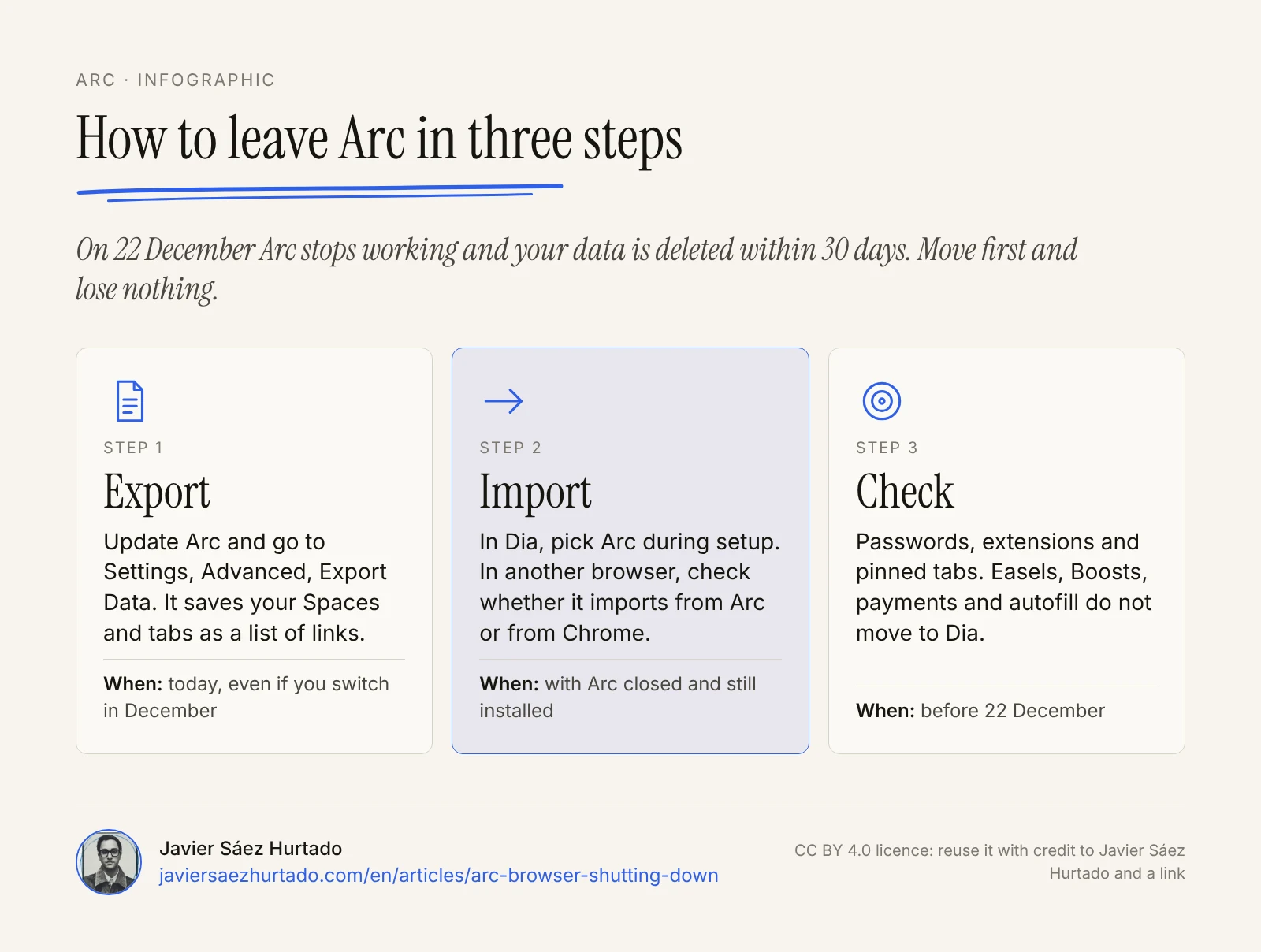
- Export. Update Arc to the latest version. On Mac, go to Arc, Settings, Advanced, Export Data. On Windows, press Ctrl and comma (or open Settings from the Arc menu) and, under Advanced, choose Export Data next to “Export Spaces and tabs”. Save the file somewhere you will find it. If you have not opened Arc in a while, you can download it again and export from inside the app before 22 December.
- Import. If you pick Dia, choose Arc as the source during setup. If you already have Dia, on Mac it is under Dia, Import from Another Browser; on Windows, in the app menu. On Windows, quit Arc first and do not uninstall it until the import finishes.
- Check what does not travel. Save the Easels you want to keep as images, note down your Boosts if you used them, and add your cards again in your new browser or, better, in a separate password manager.
On mobile, Arc Search can export too: from the tab switcher, Settings and Export Data on iOS, or Settings, Storage and Export data on Android. Do it before 23 November if you want to keep your synced tabs.
Is it worth moving to Dia?
If you used Arc for its vertical tabs and Spaces, Dia is the closest thing, and the only one that imports nearly everything in one go. Arc’s browser features are free in Dia and AI is optional. What changes is the business model: Dia’s AI is paid.
This is what Dia’s plans page shows on 29 October 2026:
- Better Browser, free. Profiles, tab groups, split view, picture-in-picture video, an ad and tracker blocker and sync across devices. No AI.
- Better Answers, $10 a month. A morning brief, asking Dia to find, summarise, draft or build things, and connecting tools such as Slack, Gmail, Notion, Outlook, GitHub, Google Calendar or Figma, with a monthly allowance measured in tasks.
- Better Days, $100 a month. The same with 20 times more asks for chats, tasks, reports and decks.
There is a 14-day trial of Better Days with no card required. If you go over your allowance, AI pauses until the next billing cycle unless you buy $20 credit blocks. People who already had Dia keep their free AI access for now, with at least 30 days’ notice before it changes, and these plans do not apply on Windows yet.
Dia runs on Mac and, since 6 October 2026, on Windows, with sync between the two since 22 October. It publishes no country restrictions, so you can use it from Europe. Two details worth knowing: on 24 September Dia retired its memory feature and deleted the data it had stored, and on Windows the company warned at launch that the build was early.
Who it suits: people who lived in Arc, work with tools such as Slack or Notion and are happy to pay for an assistant inside the browser. If you just want a comfortable browser, the free plan does that, without AI.
Which other AI browsers can you switch to?
Several, but not every one you read about works everywhere. This is where things stand on 29 October 2026, based on what each company publishes about price, agent features and availability, with Europe in mind.
AI alternatives to Arc, point by point
Official and specialist press data, as of 29 October 2026
| What the AI does | Does it act for you? | Price | In Europe | |
|---|---|---|---|---|
| Dia (The Browser Company) | Chat with your tabs, skills, connectors and a morning brief | Tasks and reports with your connected apps | Browser free; AI from $10 a month | Yes, on Mac and Windows |
| Comet (Perplexity) | Assistant that reads the page and your tabs, with Perplexity search | Yes: fills in forms and does tasks with credits, few on the free plan | Free; Pro, $20 a month | Yes, on Mac, Windows, iOS and Android |
| Microsoft Edge with Copilot | Copilot compares across tabs with your permission, with voice and vision | Only “Browse with Copilot”, for Microsoft 365 Premium in the US | Free | Yes, except the agent |
| Opera Neon | Chat, Do and Make agents and research | Yes, on the Standard plan | Browser free; AI, $19.90 a month | No published restriction, on Windows and Mac |
| Brave with Leo | Assistant that reads the tab without storing your chats | In testing | Free with open models; Premium, $14.99 a month | Yes, on every platform |
| Chrome with Gemini | Gemini in the side panel and automatic browsing | US only | Free; the agent needs Google AI Pro or Ultra | Not in the EU yet (yes in the UK) |
A few notes that do not fit in the table:
- Comet has been free for everyone since October 2025. Its assistant answers questions about what you see at no cost, but tasks where the agent browses, clicks and fills in forms use credits, and the free plan has few.
- Edge retired its “Copilot Mode” in May 2026 and folded its features into the regular browser. Reading across several tabs is available to everyone; the agent that browses for you is not, for now.
- Opera Neon has been a free download since 12 August 2026 and lets you plug in your own agents, but its own AI, the part that acts, researches and generates, requires the Standard plan.
- Brave with Leo is the most careful option with your data: according to TechRadar’s review, it does not store conversations or log your IP address, and its autonomous browsing mode is still being tested.
- Chrome with Gemini is the big gap for European readers. Google offers it in the US and, since 14 July 2026, in the UK, but no EU country is on its list, and Gemini Spark, its background agent, is not available in the European Economic Area either.
What about ChatGPT? OpenAI shut down its own browser, ChatGPT Atlas, on 9 August 2026, and its assistant now runs as an extension inside Chrome and other Chromium-based browsers. It is an option if you already pay for ChatGPT, but it does not replace Arc as a browser.
Is an AI browser safe to use?
It is as safe as the permissions you give it. An AI browser can see every site you are signed in to: your email, your bank, your work tools. If it can also act, fill in or send, any mistake it makes happens under your identity.
The best-known risk is prompt injection: text hidden in a web page or an email that tries to give the assistant orders. No company has fully solved it, and The Browser Company itself points to the cost of keeping a browser secure today as the reason for closing Arc.
Three simple steps cut the risk a lot:
- Separate profiles. One for banking, government services and personal life, with no AI or with AI switched off. Another for work, where you use it. Dia, Edge, Brave and Chrome all support profiles.
- Minimum permissions. Connect your apps read-only at first and add write access only once you see the assistant getting things right.
- A human approves anything irreversible. Sending, paying, signing or deleting should always go through you. Agents with their own cloud browser, such as Claude Duet, already ask before those actions; expect the same from yours.
My view: what I would do when leaving Arc
First, export today. The shutdown has a date and so does the deletion, and there is nothing to gain by waiting for the last weekend.
Then I would separate two decisions that the announcement blurs: which browser you want to use every day, and which AI assistant you want inside it. If you liked Arc for the way it organised tabs, Dia is the easiest move and its free plan already gives you that. I would add the AI only if you will really use it with your tools, and I would try the 14-day trial first.
If the AI is what draws you, I would start with one that reads but does not act: Edge with Copilot, Comet as an assistant or Brave with Leo. Comparing products, summarising a report or finding a lost tab is useful and low risk. Letting an agent fill in, buy or send on your behalf is a different conversation, one I have had about always-on agents like Grok Bot and dots and in my essay on how much to let an agent do without looking (in Spanish).
And I would always keep one boring browser, with no assistant, for banking and paperwork. It is not distrust of AI; it is not putting every permission in the same place.
Transparency: Convexify, the firm I founded, is part of the OpenAI Select Partner programme. This article mentions ChatGPT and is based on public documentation from The Browser Company, Perplexity, Microsoft, Opera, Brave and Google and on the linked sources.
Key takeaways
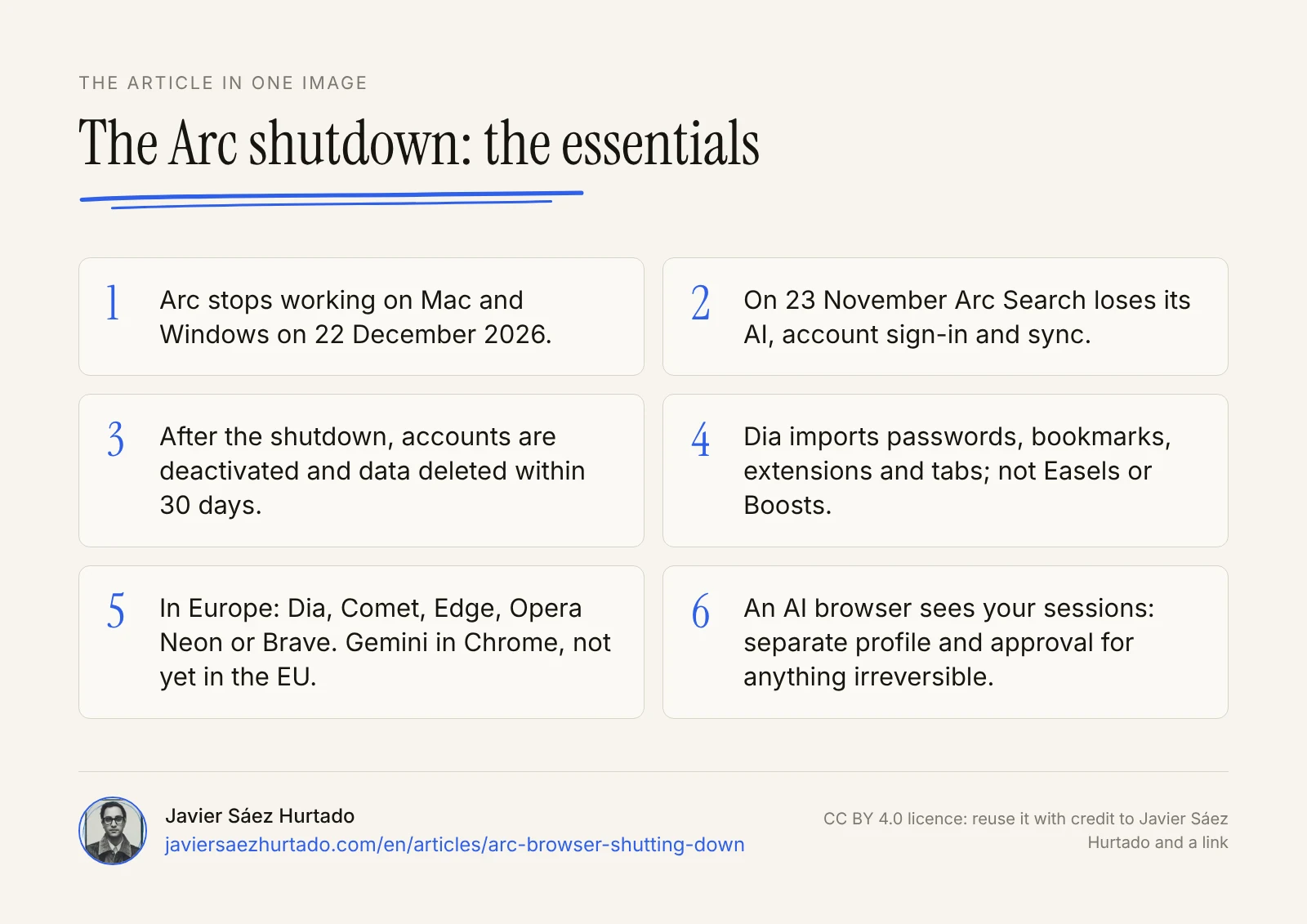
- Arc stops working on Mac and Windows on 22 December 2026, and your data is deleted within the following 30 days.
- On 23 November Arc Search loses its AI and sync; export first if you use it on mobile.
- Dia imports almost everything, but not Easels, Boosts, payment methods or autofill. Its browser is free and its AI costs from $10 a month.
- Dia, Comet, Edge with Copilot, Opera Neon and Brave with Leo work in Europe; Gemini in Chrome does not yet.
- An AI browser sees your sessions: a separate profile for sensitive sites, minimum permissions and human approval for anything irreversible.
The article in one image
Frequently asked questions
When does Arc stop working?
On 22 December 2026, on Mac and Windows. That day The Browser Company deactivates Arc accounts and deletes the related personal data within the following 30 days. Two dates come first: sign-ups closed on 22 October, and on 23 November Arc Search loses its AI features and sync on mobile.
Can I keep using Arc after 22 December?
Not on your computer: the company says Arc stops working on macOS and Windows that day and that afterwards it cannot find or retrieve anyone’s data. On iPhone, Arc Search stays as a basic browser, with no AI, no account and no sync from 23 November; on Android it is removed from Google Play on 22 December.
How do I export my data from Arc?
Update Arc and go to Settings, Advanced, Export Data (on Windows, press Ctrl and comma to open Settings). It saves a file with your Spaces and tabs as a list of links. If you move to Dia, you can import straight from Arc during setup, with Arc closed and still installed.
Is Dia free?
The browser is: profiles, tab groups, the ad blocker and sync cost nothing, and Arc’s browser features are included. AI is paid for new users: Better Answers costs $10 a month and Better Days $100, with a 14-day trial and no card required, according to Dia’s plans page on 29 October 2026.
What happens to Arc Search on mobile?
On 23 November 2026 it loses Browse for Me and its other AI features, and sign-in and tab sync stop working. On iOS it stays as a basic local browser; on Android the app is removed from Google Play on 22 December. You can export your tabs from its settings before then.
What is the best Arc alternative?
It depends on why you used Arc. If you liked vertical tabs and Spaces, Dia is the closest and imports almost everything. If you want an assistant that reads your tabs for free, Comet, Edge with Copilot and Brave with Leo all work in Europe. Gemini in Chrome is available in the US and the UK, but not yet in the EU.
Sources
- The Browser Company, A farewell to Arc (arc.net, October 2026)
- Arc on X, sunset announcement for 22 December 2026 (22 Oct 2026)
- Dia, plans and pricing
- Dia, changelog
- Microsoft Edge Blog, New updates to Edge across desktop and mobile (13 May 2026)
- Opera, Your AI agents can use Opera Neon free of charge (12 Aug 2026)
- Opera, Opera opens public access to Opera Neon (11 Dec 2025)
- TechCrunch, Arc browser sunsets December 22 as The Browser Company doubles down on Dia (22 Oct 2026)
- 9to5Mac, Arc browser gets a sunset date, and users have two months to move on (22 Oct 2026)
- MoreRead, Arc for desktop ends December 22: save your tabs and check what Dia cannot import (23 Oct 2026)
- PiunikaWeb, Dia, the AI-powered browser from the makers of Arc, is now available on Windows (7 Oct 2026)
- PPC Land, Gemini Spark blocks EU and UK users as Google adds 160 countries
- InEUyet, Is Gemini in Chrome available in the EU? (28 Oct 2026)
- eesel AI, Perplexity Comet pricing in 2026
- TechRadar, Brave Leo AI review (13 Jul 2026)