Claude Meetings explained: how it works in Google Meet and what to check before you add it
Claude Meetings is the feature, in beta since 12 November 2026, that adds Claude to a Google Meet call as a visible participant: it takes notes, answers in writing in the chat and makes documents and whiteboards while the team talks. It is only on the Team and Enterprise plans, part of what it does is free only until 10 February 2027, and making sure people agree to be transcribed is the job of whoever adds it.
What is Claude Meetings?
Claude Meetings is a Claude feature that adds it to a Google Meet video call as one more participant, in plain view. It follows the conversation, writes the notes and action items, answers questions in writing in the chat and makes documents, whiteboards and presentations while the meeting goes on. Anthropic announced it on 12 November 2026 and is turning it on gradually, in beta, for the Team and Enterprise plans.
- Meeting page
- The page in Claude that keeps the summary, the action items, the transcript and everything Claude made in the call. During the meeting it shows the live transcript and has a chat that stays inside your organization.
- Auto-join
- The setting that makes Claude join your meetings on its own: all of them, or all except one-on-ones. Each person turns it on for themselves; an owner cannot turn it on for you.
What sets it apart from a note taker is timing. Claude does not wait until the end to summarize. It drafts and answers while people are still talking.
When did Claude Meetings launch, and who can use it?
The beta started on 12 November 2026, not on the 10th. On 10 November, Anthropic announced Claude Whiteboards, Sheets and Data, said Meetings was coming soon and started the investor roadshow for its IPO; outlets such as TechCrunch reported it as launched that day. Anthropic’s announcement and release notes are dated the 12th and describe a gradual rollout, so your organization may not have it yet.
To use it you need:
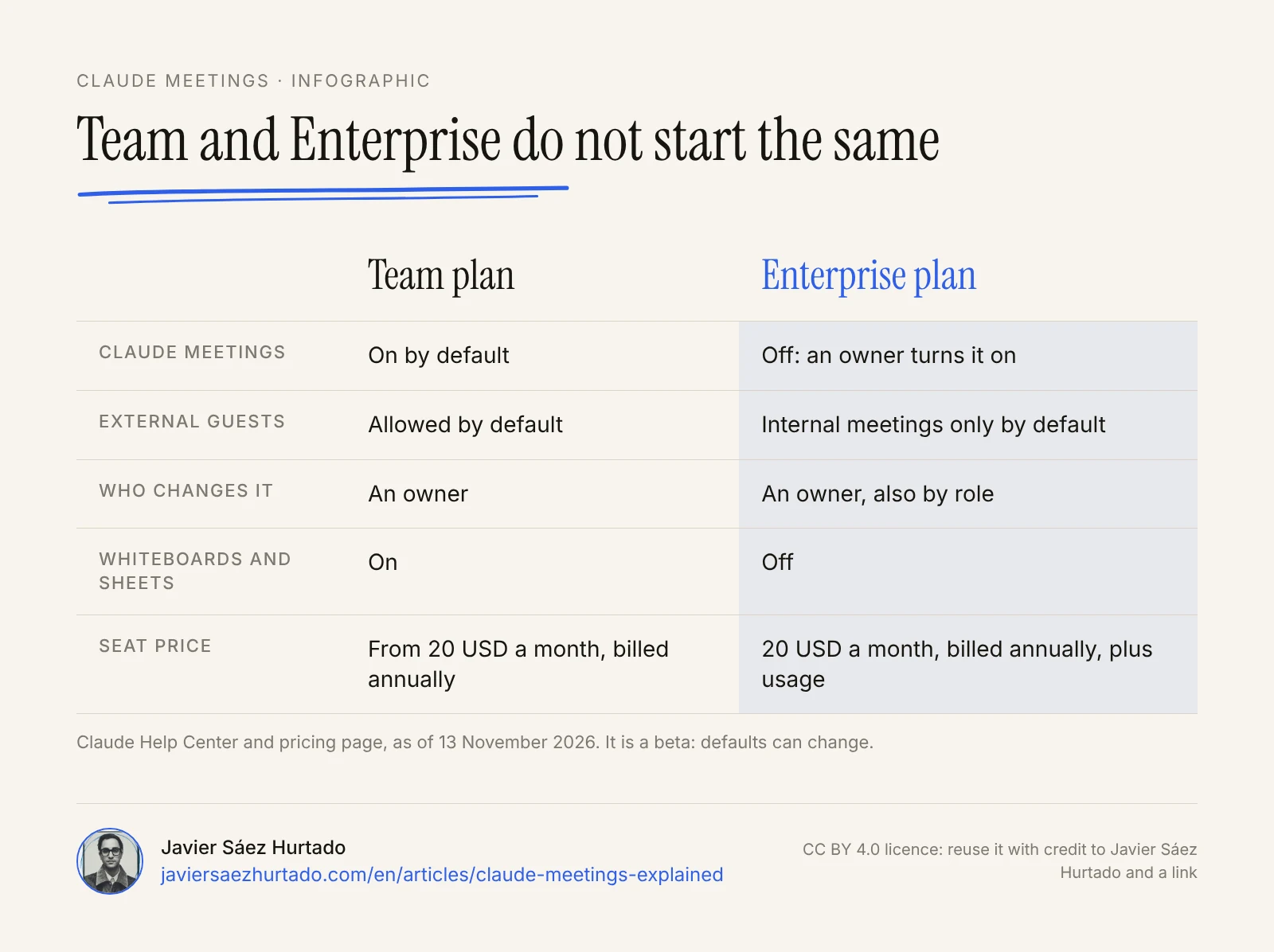
- A Team or Enterprise plan. It is not on Free, Pro, Max or Ultra. On Team it is on by default and an owner can turn it off. On Enterprise it is off and an owner turns it on, for the whole organization or for some roles.
- Google Meet and Google Calendar. You add Claude from the Meetings section of Claude, with your Google calendar connected.
- Claude on the web or Claude Desktop. The documentation does not mention the mobile app.
- Not to be in an excluded group. The beta leaves out organizations with zero data retention (ZDR), HIPAA-ready configurations or customer-managed encryption keys (CMEK).
Neither the announcement nor the help center sets a country limit, unlike Claude Personal Finance, which is marked as US only. European countries such as Spain are on Anthropic’s list of supported regions, but there is no country-by-country confirmation and no word on which languages it transcribes.
How does Claude Meetings work in Google Meet?
You add it to a meeting on your calendar, it joins as a participant and it works with what it hears and what is shared on screen. Step by step, according to the help center:
- Setup, once. An owner enables Google Calendar for the organization and you connect your calendar in the Meetings section of Claude.
- Add it. Pick a meeting and click “Add Claude”. If you would rather not do this each time, there is auto-join.
- Joining. Claude shows up as a participant and posts a notice in the Meet chat with a link to the meeting page. If the host declines its request to join, it does not try again unless someone adds it again.
- Questions. Say “Claude” and then your question, or type it in the Meet chat. By default it answers in writing in that chat, which everyone on the call can see.
- Making things. Use phrases such as “Claude, make a doc” or “Claude, make a whiteboard”. The result is attached to the meeting page and teammates on the invite can edit it while they keep talking.
- Connected tools. If it needs someone’s tool (the help center’s example is sending a Slack message), it asks that person for permission. If the request is spoken, for now it checks who is speaking every time.
- Pausing and leaving. You can ask it to stop listening or to leave, or remove it from the meeting page. It stays for up to eight hours and warns before it leaves.
- Afterwards. The page keeps the summary, the action items, the transcript and what was made, and people in your organization who were on the invite get a summary email. Later you can ask Claude about that meeting in any chat.
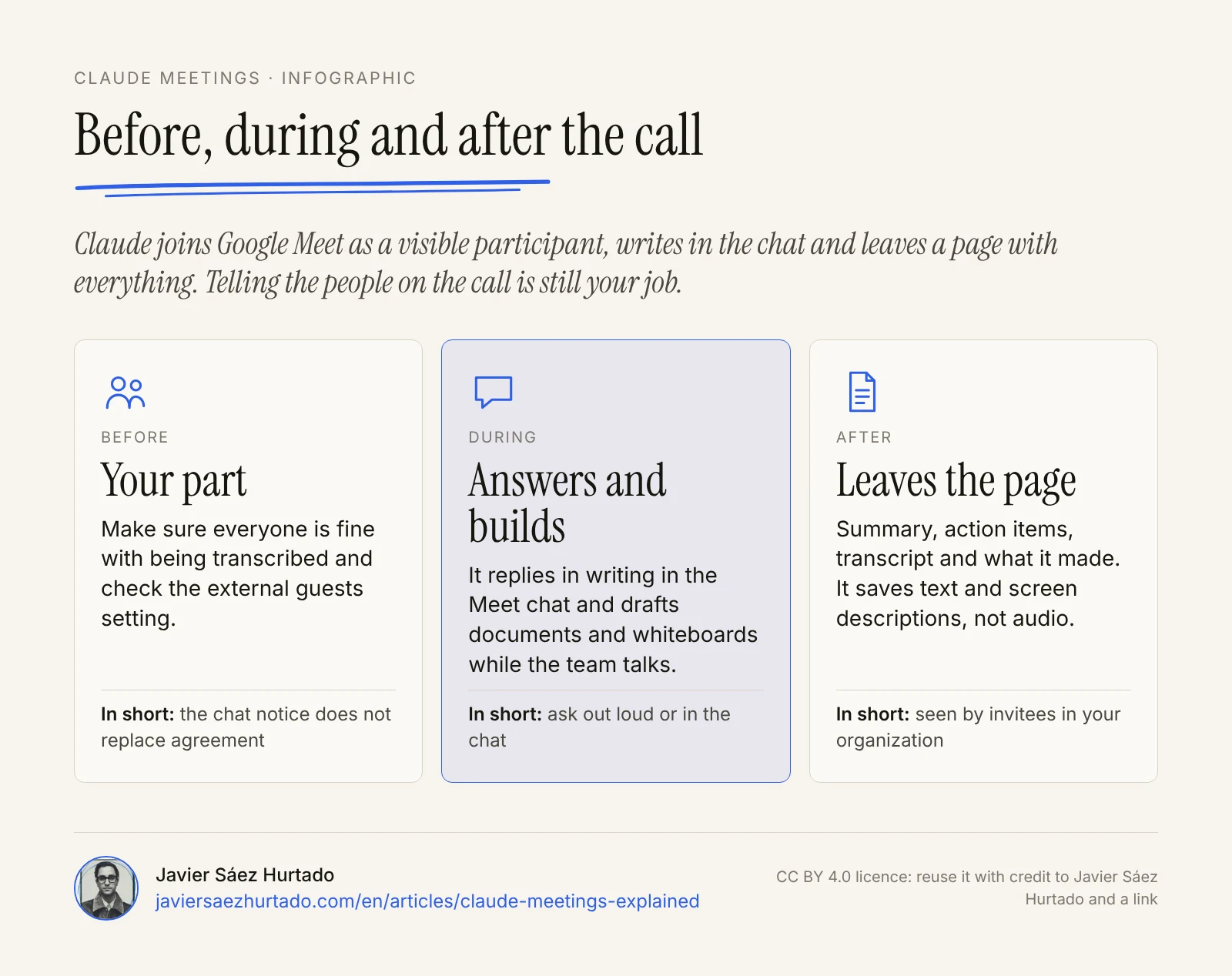
Anthropic’s example is a team planning a customer event. Someone asks Claude to start a doc for the plan and Claude drafts what has been said so far. Another person asks what last year’s event cost: Claude asks for approval to look it up, posts the figure in the chat and compares it with the plan. When dates come up, someone asks for them on a whiteboard. It answers and it uses tools, but in front of the whole team and with permission.
Does Claude Meetings work with Teams or Zoom?
No. As of 13 November 2026, Claude Meetings only works in Google Meet. Anthropic says other platforms are coming, without naming them and without a date. If your company meets on Microsoft Teams or Zoom, you cannot use it today.
You cannot send the transcript to other tools yet either. Anthropic says it is working on that with Gong, Granola, Fireflies.ai, Otter and others, with no date.
How much does Claude Meetings cost?
During the beta it has no price of its own, but not everything is free. There are three layers.
What you pay for in the Claude Meetings beta
As of 13 November 2026
| During the beta | Afterwards | |
|---|---|---|
| Notes and transcripts | Included on Team and Enterprise, along with answers that do not use connected tools | Not stated |
| Documents and whiteboards | Those made in a call are free until 10 Feb 2027 | Price not stated |
| Connected tools | Answers that use them count toward plan usage and may lead to charges | Not stated |
What does cost money is the plan. According to Claude’s pricing page on 13 November 2026, Team (2 to 150 people) is 20 dollars a month per standard seat billed annually, or 25 month to month; a premium seat is 100 dollars billed annually, or 125 month to month. Enterprise starts at 20 dollars per seat a month billed annually, with a minimum of 20 seats, plus usage at API rates.
Anthropic has not said what documents and whiteboards will cost from 11 February 2027, or what Meetings will cost after the beta. If you adopt it now, you do so without knowing the final price.
What does Claude Meetings save, and who can see it?
It saves text, not sound. Anthropic says it keeps the transcript, the summary and descriptions of what is shared on screen, and that it does not save audio.
- Who sees the meeting page. People in your organization who were on the invite. They can view it, edit it and share it with other colleagues.
- Two different chats. What Claude writes in the Meet chat is visible to the whole call. The chat on the meeting page stays inside your organization.
- Training and retention. There are no rules specific to Meetings. Anthropic’s general policy for its business products is not to use that content to train its models by default, and to remove deleted content from its systems within 30 days. No retention period has been published for transcripts.
- Owner controls. Turn Meetings on or off, allow or block meetings with external guests, and decide whether Claude can use members’ connectors in meetings.
What Anthropic does not solve for you is agreement from the people on the call. Claude identifies itself and posts a notice in the chat, but the announcement asks you to make sure everyone on your calls is fine with being transcribed before you add it or turn on auto-join.
What happens when guests from outside the company join?
It depends on the plan, and the announcement and the help center do not say quite the same thing. The announcement says that, by default, Claude does not join if someone from outside the organization is invited, and leaves if an outside guest joins midway. The help center, which is more detailed, says that is the default on Enterprise. On Team, meetings with external guests are allowed by default and an owner can turn that off.
When those meetings are allowed:
- Claude posts its notice in the chat, but does not answer there.
- What guests say goes into the notes and the transcript.
- Guests do not get the meeting page or the summary email.
When they are not allowed, Claude also leaves if another company’s note-taking bot joins. For a small company on Team, the practical point is simple: look at that setting before your first call with a client.
What are Claude Whiteboards, Claude Sheets and Claude Data?
They are the workspaces Anthropic announced on 10 November 2026, two days before Meetings. They are closely tied to meetings: in a call, Claude can make whiteboards, documents and other artifacts.
- Claude Whiteboards (beta). A shared board for thinking with Claude, on all paid plans. You can take it to Lucid, Miro or Zoho’s Vani.
- Claude Sheets (beta). Spreadsheets with tabs, formulas and formatting that Claude builds and edits with the team. Anthropic admits it is simple for now. It exports to .xlsx and CSV.
- Claude Data. The new name for Claude Dashboards, which is no longer in beta. It needs a data connector.
They sit next to Claude Duet, Anthropic’s proactive agent, which works on its own in the background.
Claude Meetings vs Gemini in Meet, Copilot in Teams and ChatGPT Record
All four turn a meeting into notes, but not in the same way. What makes Claude Meetings different is that it joins as a participant, answers where everyone can see it and makes documents during the call.
Four ways to bring an assistant into a meeting
Based on each company’s official help pages, accessed 13 November 2026
| Claude Meetings (Anthropic) | “Take notes for me” (Google) | Copilot in Teams (Microsoft) | ChatGPT Record (OpenAI) | |
|---|---|---|---|---|
| How it takes part | Visible participant in the call | A Gemini feature inside Meet | A Teams pane with a private chat for each person | Records from the user’s desktop app |
| Where it works | Google Meet | Google Meet | Microsoft Teams | ChatGPT app for macOS |
| What it leaves | A page with summary, action items, transcript and what it made | Notes in a Google Docs document | Summary, suggested action items and answers; exports to Word or Excel | Transcript and summary saved as a canvas |
| Control and consent | Notice in the chat; agreement is handled by whoever adds it | The admin can require explicit consent from everyone (off by default) | The organizer decides: during and after, only during, or off | OpenAI asks you to get the right consents before recording |
| Languages | Not stated | Eight, including Spanish; one per meeting | Not stated on the page checked | Works best in English |
Three more details, all from the official documentation. “Take notes for me” needs an eligible Google Workspace edition or Google AI plan, and Google recommends it for meetings of 15 minutes to 8 hours. Copilot does not work in meetings hosted outside the participant’s organization. ChatGPT Record, on the Plus, Pro, Business, Enterprise and Edu plans, allows up to four hours per session and deletes the audio after transcription.
What does it mean for companies in Spain and Europe?
It means there is data protection work to do before you turn Claude Meetings on, and it belongs to the company that uses it. What follows is not legal advice. It is what the official sources say.
The GDPR defines personal data as any information relating to an identified or identifiable person. In 2026, the Spanish data protection authority (AEPD) published two blog posts on AI voice transcription, and several of its points fit a tool like this:
- As a general rule, a person’s voice is personal data, and so are the content of the conversation and the service metadata.
- The organization that adopts the service acts as the data controller, whether the tool is its own or a third party’s.
- The information has to arrive before the start. The controller must make sure information about the recording and its purposes reaches all participants before the session begins, and reinforce it with a perceptible signal while it lasts.
- Joining the call is not consent. The AEPD cites its decision PS/00342/2023, where it rejected the idea that warning attendees that “by joining they give their consent” is enough.
- Consent for one session does not cover the next ones, and the authority says you need to assess whether consent can be valid between employer and employee. It mentions other possible legal bases, such as a contract or legitimate interest.
- A transcript is not a neutral text. It is attributed to a specific person: the AEPD talks about accuracy, human review and ways to correct errors.
- Choose the provider with care: what extra processing it does, whether it retrains on the data, how long it keeps it and where it is stored.
With that list in hand, the questions for Claude Meetings are clear. Auto-join deserves more care than adding it to one meeting. The retention period for transcripts has not been published. And on Team, external guests are allowed by default and what they say is transcribed, even though they do not get the page or the summary.
What is still unknown about Claude Meetings?
Quite a lot, and it is worth keeping in mind before you decide:
- Which languages it transcribes and answers in. There is no word on how it handles a meeting in Spanish.
- Which Claude model it uses in calls.
- The price after the beta.
- When it will reach Zoom, Teams or other platforms, and whether it will come to individual plans.
- How long transcripts and screen descriptions are kept.
It is a beta: prices and defaults can change.
My view: let it take notes, not speak for me
I like the careful parts of the design. Claude joins where everyone can see it, does not save audio, checks who is speaking when someone asks it out loud to use their tools and, if you set it that way, stays out of meetings with outside guests.
I would use it first in internal meetings, with the whole team told in advance and without auto-join. Adding it meeting by meeting makes you think each time whether it makes sense. I would treat the notes and action items as a draft that someone reviews before it counts, because a transcript with an error ends up attributing to a person something they did not say.
What I would not do is leave communication with other people to it. Looking up last year’s figure is fine. Sending a message in my name from a meeting is not. It is the same line I draw in my essay on how much to let an agent do without looking (in Spanish): what affects other people and cannot be undone needs a person in front of it. And I would not turn it on with clients without telling them first and checking the external guests setting.
Transparency: Convexify, the firm I founded, is part of the OpenAI Select Partner program, and OpenAI competes with Anthropic. This article compares Claude Meetings with products from Google, Microsoft and OpenAI and is based on public documentation from the four companies, on two AEPD publications and on the linked sources.
Key takeaways
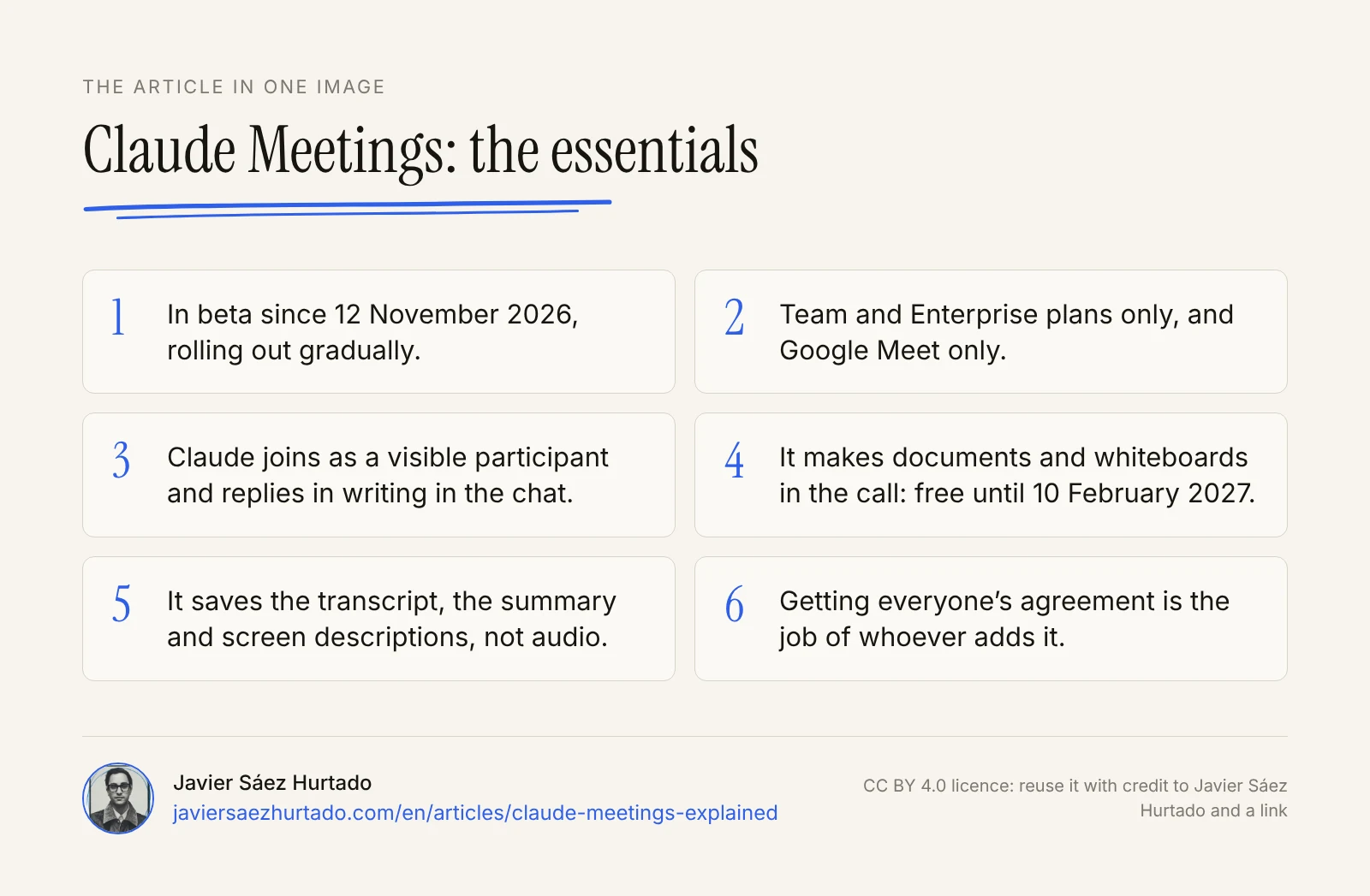
- Claude Meetings has been in beta since 12 November 2026, only on Team and Enterprise and only in Google Meet.
- Claude joins as a visible participant, answers in writing in the chat and makes documents and whiteboards during the call.
- What it makes in calls is free until 10 February 2027; using connected tools counts toward plan usage.
- It saves the transcript, the summary and screen descriptions, not audio. Getting agreement from the people on the call is up to whoever adds it.
- On Team, external guests are allowed by default; on Enterprise, they are not.
The article in one image
Frequently asked questions
What is Claude Meetings?
It is a Claude feature, in beta since 12 November 2026, that adds Claude to a Google Meet video call as a visible participant. It follows the conversation, takes notes, answers in writing in the chat and makes documents and whiteboards during the call. Afterwards it leaves a page with the summary, the action items and the transcript.
Does Claude Meetings work with Microsoft Teams or Zoom?
No. As of 13 November 2026 it only works in Google Meet. Anthropic says other platforms are coming, but it has not said which ones or when.
How much does Claude Meetings cost?
You need a Team or Enterprise plan. During the beta, notes, transcripts and answers that do not use connected tools are included. Documents and whiteboards made in a call are free until 10 February 2027. Answers that use a connected tool count toward plan usage and may lead to charges.
Does Claude Meetings record meetings?
Anthropic says it saves a transcript, a summary and descriptions of what is shared on screen, and that it does not save audio. When external guests are allowed, what they say also goes into the notes and the transcript.
Is Claude Meetings available in Europe?
Neither the announcement nor the help center sets a country limit, and European countries such as Spain are on Anthropic’s list of supported regions. You need a Team or Enterprise plan, and the rollout is gradual. Anthropic has not confirmed availability country by country or said which languages it transcribes.
Do you have to tell people before you add Claude to a call?
Yes. Claude posts a notice in the chat when it joins, but Anthropic asks you to make sure everyone is fine with being transcribed before you add it or turn on auto-join. In Spain, the data protection authority says the information must reach all participants before the session begins.
Sources
- Anthropic, Introducing Claude Meetings (12 Nov 2026)
- Claude Help Center, Use Claude Meetings (accessed 13 Nov 2026)
- Claude Help Center, Release notes (12 Nov 2026)
- Anthropic, More ways to work with Claude: Sheets, Whiteboards, and Interactive Connectors (10 Nov 2026)
- Anthropic, Claude Whiteboards, Claude Sheets, and Claude Data (10 Nov 2026)
- Claude, pricing page (accessed 13 Nov 2026)
- Anthropic Privacy Center, Is my data used for model training? (commercial products)
- Anthropic Privacy Center, How long do you store my organization’s data?
- Anthropic, Supported Regions Policy (12 Nov 2026)
- Anthropic, launch of the roadshow for its proposed initial public offering (10 Nov 2026)
- AEPD (Spanish data protection authority), AI Voice transcription: Implications for data protection (14 Jan 2026)
- AEPD, AI Voice Transcription (II): accountability, rights and transparency (20 Apr 2026)
- Regulation (EU) 2016/679, General Data Protection Regulation (Article 4)
- Google Meet Help, “Take notes for me” in Google Meet (accessed 13 Nov 2026)
- Microsoft Support, Catch up on meetings with Microsoft Copilot in Teams (accessed 13 Nov 2026)
- OpenAI Help Center, ChatGPT Record (accessed 13 Nov 2026)
- TechCrunch, Anthropic launches Claude Meetings to turn workplace discussions into plans and tasks (10 Nov 2026)
- Yahoo Finance, Anthropic launches Meetings, Whiteboards, Sheets, Data ahead of IPO (10 Nov 2026)