Claude Cowork explained: what it is, how it works and whether it is free
Claude Cowork is Anthropic’s agent for work that is not coding: it reads, creates and edits files, uses your apps and finishes whole tasks. Since 16 September 2026 Anthropic has been folding it into the Claude app itself, it is not free and it uses up your limits faster than chat. This guide, updated on 15 November 2026, explains how it works, what it costs, how to turn it on and where the risks are.
What is Claude Cowork?
Claude Cowork is an AI agent from Anthropic that works directly with your files and apps to finish tasks from start to end. Unlike a chat, it does not stop at answering: it reads documents, creates spreadsheets and decks, edits files in the folders you give it, browses with its own browser and chains steps until it delivers a result.
Anthropic introduced it on 12 January 2026 as a research preview with a line that sums up the idea well: “Claude Code for the rest of your work”. In other words, the same kind of agent programmers were already using, brought to office work for any role. On 9 April it left preview and became generally available on macOS and Windows.
What has changed: is Cowork now “just Claude”?
The biggest change since the first version of this guide is that Cowork is no longer a separate product. On 16 September 2026 Anthropic announced that “Claude Cowork and chat are merging into one Claude”: you no longer choose between chatting and handing off a task. You ask for what you need and Claude decides whether an answer is enough or whether it has to get to work. The product page puts it this way: “Claude Cowork is now just Claude”.
The rollout comes in stages:
- Pro, Max and Ultra. They came first, on web, desktop and mobile, gradually over several weeks.
- Enterprise. Generally available since 23 October 2026.
- Team. Generally available since 12 November 2026.
- Free. Anthropic says it will follow “soon”, with no date.
Chats, projects, connectors and skills carry over. If your account does not have the unified experience yet, you will see Cowork as an option next to chat. The name has not gone away: Anthropic still uses it in its help center and admin console, which is why this guide still calls it Cowork.
How does Claude Cowork work?
Claude Cowork works as an agent that plans a task, breaks it into steps and uses different tools to complete it, asking for your permission at sensitive points. Each step uses model tokens, which is why a task uses more of your limit than a question. These are the main parts:
- Folders and files. You give it access to one or more folders and it works with Word, PDF, Excel, PowerPoint, CSV, images or code without you uploading or downloading anything.
- Cloud or local. Code and commands run in an isolated, temporary environment on Anthropic’s servers, so the task keeps going even if you close your laptop. When it needs your local files, the built-in browser or computer use, it relies on the desktop app, which has to be open and connected.
- Connectors. It uses the integrations you already have in Claude, such as Google Drive, Microsoft 365, Slack or Notion, to read and write in those tools.
- Plugins and skills. A plugin bundles instructions, connectors and subagents for a specific area, such as legal, finance or sales. Skills are reusable instructions for tasks such as making documents or decks. Since 25 September, anyone can submit plugins to the Claude directory.
- Subagents and long tasks. It can split work among several subagents in parallel and keep tasks running for hours.
- Scheduled tasks. You can schedule daily, weekly or monthly tasks that run in the cloud even when your computer is off.
- Built-in browser. Since 26 August 2026 it has its own browser, separate from yours: Anthropic says Claude never sees your tabs, bookmarks or passwords.
- Computer use. It can operate apps on your screen, but this is still a research preview and it asks before opening each app.
- Memory. Since 25 August it remembers context across chat and cloud tasks.
What it produces is documents: since September, Claude Docs and Claude Slides are created inside the conversation, and in November Sheets and Whiteboards joined in beta on the paid plans.
Is Claude Cowork free? Plans and price
Claude Cowork is not free. As of 15 November 2026 it comes with every paid plan and no free one: Anthropic’s pricing table says the Free plan cannot hand off or schedule tasks. These are the published prices, in US dollars and before tax:
Claude plans that include Cowork
Prices published by Anthropic, before tax, as of 15 November 2026
| Plan | Price | Usage |
|---|---|---|
| Free | $0, no Cowork | Chat with limits every 5 hours and every week |
| Pro | $17 a month billed annually, $20 monthly | More than Free |
| Max | $100 a month | 5x Pro |
| Ultra | $200 a month | 10x Pro every week, no 5-hour limit |
| Team | $20 per person per month ($25 monthly); premium seat $100 ($125) | 2 to 150 people |
| Enterprise | $20 per person per month plus usage at API rates | 20-seat minimum |
There are two changes since September. Max no longer comes in $100 and $200 versions: it now costs $100, and the $200 tier is a new plan, Ultra, which removes the 5-hour limit for verified accounts. And Enterprise now has a public price: $20 per seat with a 20-seat minimum, plus what you use.
The most useful thing to know is that Cowork uses up your limits faster than chat. The product page says so, and the help center suggests grouping related work into one task and checking usage in Settings, Usage. Anthropic does not publish how much more it uses; the figures going around are third-party estimates. In Europe, VAT is added to the price.
How do you turn on and download Claude Cowork?
To use Cowork you need a paid plan and, if you want it to work with files on your computer, the desktop app. These are the steps from the help center:
- Download or update the desktop app from claude.com/download. It is available for macOS, Windows and Linux, the last one in beta.
- Open Claude on desktop, web or mobile.
- Choose Cowork in the message box. If your account already has the unified experience, this step is gone: Claude decides for you.
- Describe the task and, if needed, give it access to a folder or connect the apps it needs.
- Review the plan it proposes, choose the approval mode and let it work.
On web and mobile it is available on Pro, Max, Ultra and Team (still in beta on Team). On Enterprise, Cowork is on by default, but an organization owner has to turn on cloud execution and web and mobile access. In organizations with HIPAA, the US health privacy rule, it is off by default.
If you cannot see the option, it is usually one of three things: you are on the Free plan, your desktop app is out of date or your organization’s admin has turned it off.
How is it different from Claude Code and from chat?
Claude Cowork and Claude Code use the same kind of agent for different jobs. Anthropic explains it this way on the product page: Claude Code is built for software engineering, that is, writing, debugging and shipping code; Cowork is built for non-coding knowledge work, such as research, analysis, document creation and other multi-step tasks.
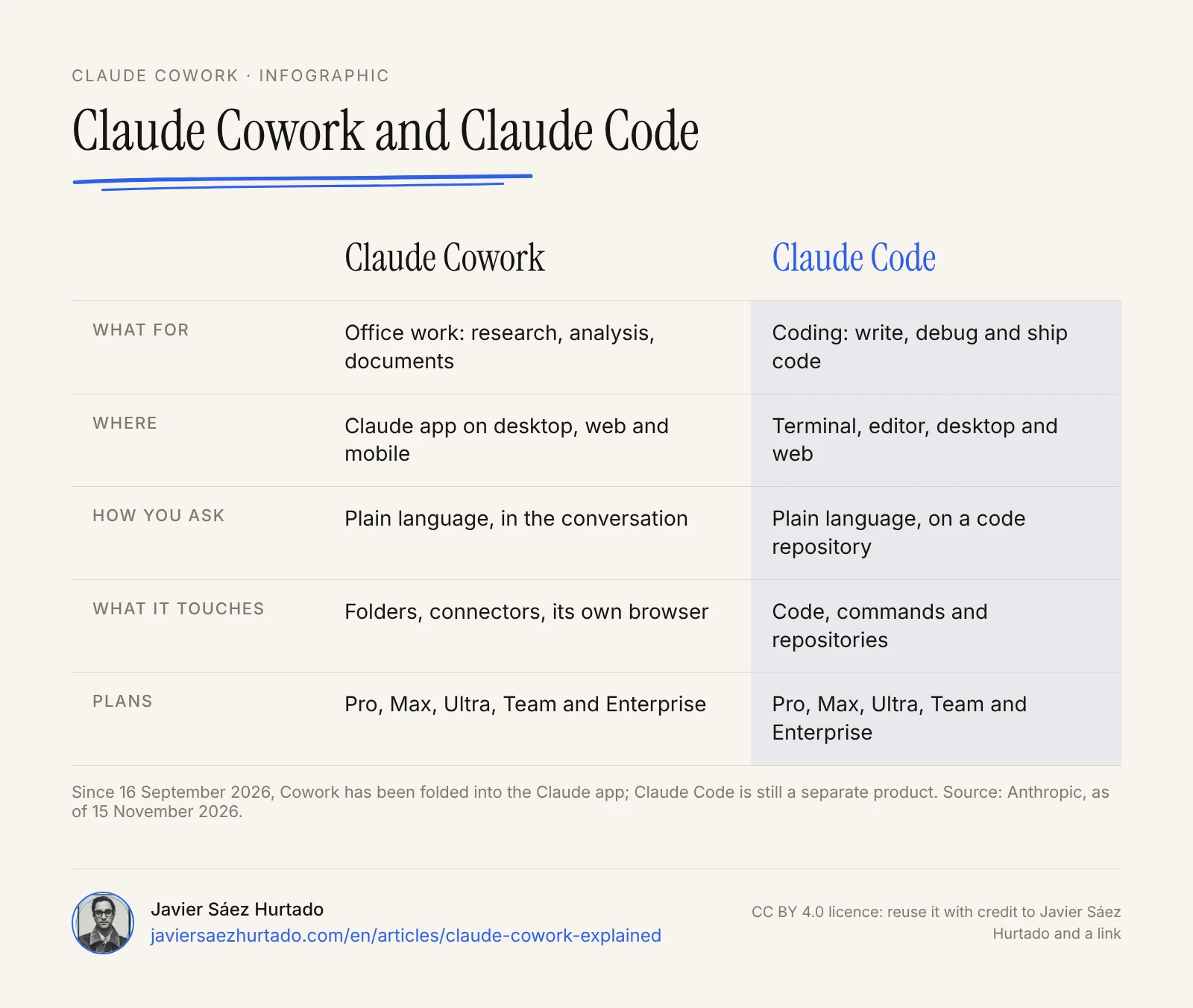
The difference from chat used to be access: in a normal conversation Claude answers, but it does not touch your files or work alone for hours. With the September merge that line disappears, and chat and agent become the same product with more or fewer permissions. Claude Code, on the other hand, is still a separate product, with its terminal, its editor extension and its web version.
Other Anthropic agents have appeared around it with different roles. Claude Duet, introduced on 21 October, lives on your phone and takes the initiative, but it is a separate app and only available in the US. Claude Meetings, in beta since 12 November for Team and Enterprise, brings Claude into Google Meet calls and can create documents while the team talks. OpenAI is taking a similar path with its agents, skills and plugins, which I explain in OpenAI agents from the inside.
Claude Cowork or OpenClaw: which one?
It is one of the most searched comparisons, and the answer depends on how much control you want and how much risk you can manage. OpenClaw is an open source agent that you install yourself, on your computer or a server, that you use through messaging apps and that connects to the model you choose. Cowork is an Anthropic product, with the model, the security and the company controls already handled.
- Choose Cowork if you want an agent for office work that runs without installing anything unusual, with approvals, admin controls and a vendor that stands behind the product.
- Choose OpenClaw only if you know how to run a server, want to pick the model or keep everything on your own infrastructure, and are ready to take on security yourself.
For most professionals and small businesses starting out with agents, Cowork is the more cautious choice. OpenClaw makes sense for technical teams that know how to isolate it properly.
Which tasks make sense to hand to Cowork?
The tasks that fit best have a clear result, use information that is already in your files or apps and can be reviewed at the end. Some common examples:
- Sorting, renaming and filing the documents in a folder and delivering an index.
- Turning a spreadsheet into a report with conclusions and charts.
- Preparing a first draft of a deck from notes and documents.
- Gathering information from several sources and summarizing it in a document with links.
- Repeating the same report every week with new data, as a scheduled task.
- Checking contracts or invoices for missing fields, without sending anything.
It makes the least sense for irreversible decisions, tasks with very sensitive data or work where you could not tell whether the result is right. A good first task is tidying a folder you have backed up somewhere else: it is useful, takes minutes to review and puts nothing at risk.
Is Claude Cowork safe? Risks and how to use it
Cowork’s main risk is the same as any agent with real access: it can act wrongly because of its own mistake or because malicious content gives it instructions. Anthropic says it plainly in its help center: Cowork has unique risks due to its agentic nature and internet access. These are the safeguards it puts in place:
- Limited access. It only sees the folders and apps you choose.
- Deletion needs permission. You have to click “Allow” before it permanently deletes files.
- Three approval modes. In manual mode it asks before acting. In automatic mode, Claude reviews each action before it runs and blocks anything it considers unsafe. In “Skip all approvals”, nothing checks what it does.
- Content screening. Anthropic scans external content entering the task and flags possible prompt injections.
- Company controls. Admins can turn Cowork off, limit it by group, set spend limits, decide whether automatic mode is available and stream activity to their security tools.
One detail to watch: automatic mode is available by default on Pro, Max, Ultra and Team, and off on Enterprise. And Anthropic warns that in automatic mode and in the skip mode, if Claude reads malicious content mid-task it could act on those instructions before you notice. Prompt injection, meaning instructions hidden in a document or web page that the agent takes as orders, has no complete fix today.
Four practical rules cut the risk a lot:
- Do not give it access to folders or apps the task does not need.
- Use manual mode for the first tasks and for anything that leaves your machine, such as emails or posts.
- Keep backups of anything it can change.
- Do not use the skip mode outside tests with dummy data.
What does it mean for companies in Europe?
Cowork is available in Spain, Andorra and the whole European Union: Anthropic’s list of supported countries, updated on 12 November 2026, includes them and names Cowork among the products covered. There is no Europe-specific restriction, unlike some other Anthropic features that are US-only for now.
For a company, what matters most is where the data ends up and who can review it:
- Training. On consumer plans (Free, Pro and Max), Anthropic uses your conversations to improve its models only if you allow it in settings. Business plans and the API have their own commercial terms. Before putting client data in, check that setting and the plan each person uses.
- Audit. Cowork sessions on web, desktop and mobile are captured in the Compliance API, which returns the last 30 days.
- Local sessions. What runs on each person’s computer is stored on that machine, outside Anthropic’s retention policies, and admins cannot manage or delete it centrally.
As with any tool, the company remains the controller for the personal data it puts in the agent’s hands. My advice is to use a Team or Enterprise plan for work with client data and keep individual plans for personal use.
My view: delegate what can be reviewed, not what cannot be undone
At Convexify, the AI firm I founded in Andorra, we apply to Cowork the same rule as to any agent we build for clients: autonomy is earned with tests on real work. We start with narrow tasks that are easy to review, widen permissions only when the results are reliable and keep explicit human approval for anything that cannot be undone.
I think the September merge is good news for beginners, because it removes a decision that confused many people: you no longer need to know whether your request is “a chat” or “a task”. But it has a trade-off worth keeping in mind. When the agent decides by itself when to start working, it is easier to forget that it has access to your folders and apps. That is why I would not leave automatic mode on by default for a team before agreeing on what it gets access to and what it does not.
What Cowork changes most is not the quality of any one document, but who can use an agent. Until very recently, handing a whole task to an AI meant knowing how to code or building an integration. Now it is enough to describe the result you want well and give access to just what is needed. In my experience, the skill that makes the difference is no longer technical: it is defining the task, deciding what to give the agent and checking what it returns.
Key takeaways
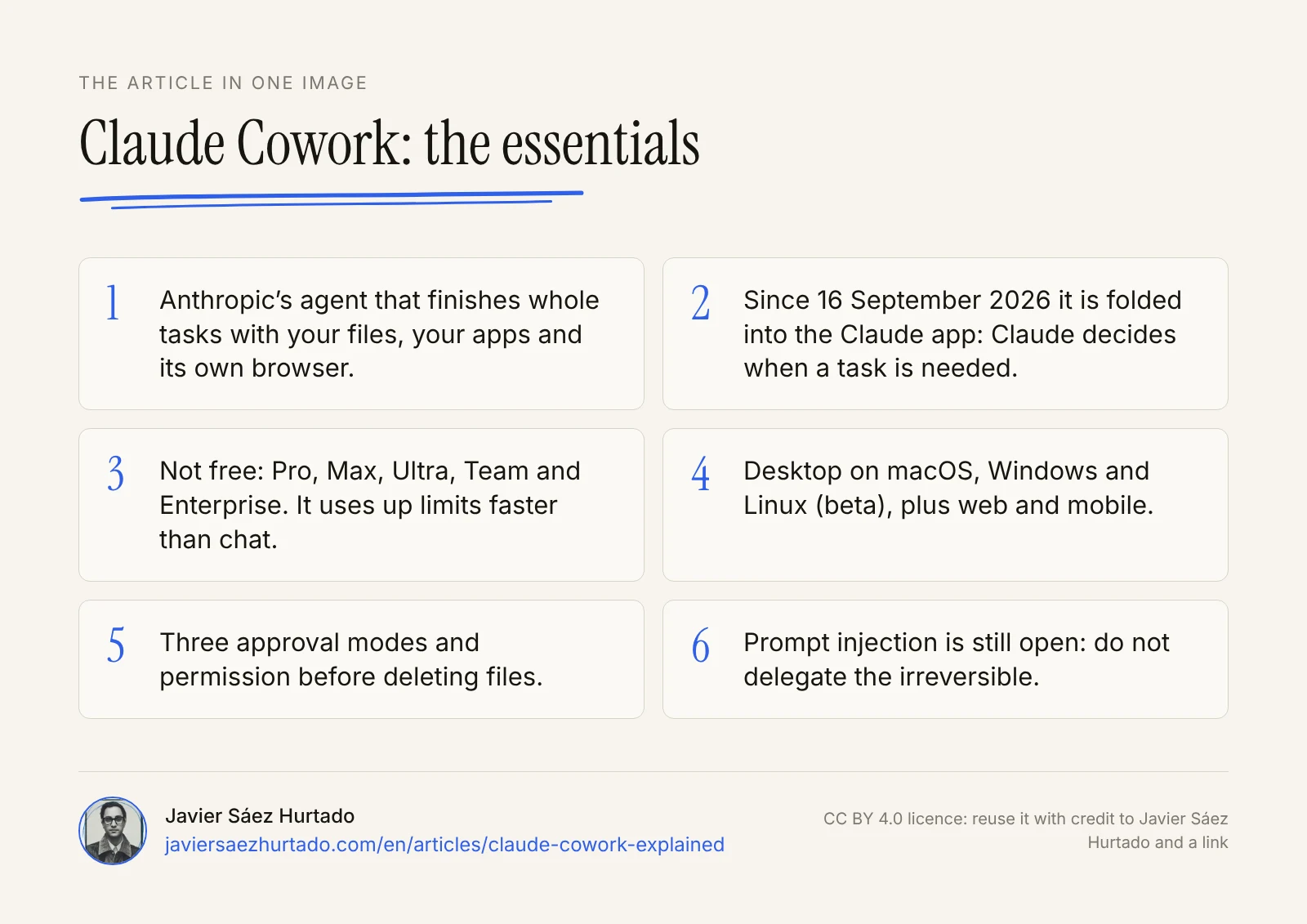
Claude Cowork is Anthropic’s agent for office work: it carries out whole tasks with your files, your apps and its own browser, on desktop, web or in the cloud. Since September 2026 it has been folded into the Claude app, it is on every paid plan and no free one, and it uses up your limits faster than chat. It has sensible safeguards, but it does not remove the need to supervise what it does. The safest way to start is the usual one with any agent: little access, small reviewable tasks and more autonomy as it proves it works.
The article in one image
Frequently asked questions
What is Claude Cowork?
It is Anthropic’s agent for work that is not coding. Instead of only answering, it reads and creates files, uses your connected apps and its own browser, and chains steps until it delivers a result: a report, a spreadsheet, a deck or a tidy folder. Since 16 September 2026 Anthropic has been folding it into the Claude app, so on many accounts it no longer shows up as a separate mode.
Is Claude Cowork free?
No. As of 15 November 2026 it comes with the paid plans: Pro ($17 a month billed annually or $20 monthly), Max ($100), Ultra ($200), Team (from $20 per person per month) and Enterprise. On the Free plan you cannot hand off or schedule tasks. Anthropic has said the new unified experience will also reach Free, with no date and no detail on what it will include.
How do you turn on Claude Cowork?
With a paid plan, open Claude on the web, desktop or mobile, choose Cowork in the message box, describe the task, review the plan it proposes and let it work. If your account already has the unified experience there is nothing to turn on: Claude decides by itself when a request needs a task. On Team and Enterprise it is on by default, but admins can turn it off.
Does Claude Cowork work on Windows?
Yes. It works in the Claude desktop app for Windows and macOS, and on Linux in beta. You download it from claude.com/download. It reached Windows on 10 February 2026 and has been generally available on both systems since 9 April. You can also use it on the web and on mobile, although working with local files needs the desktop app open.
What is the difference between Claude Cowork and Claude Code?
They use the same kind of agent for different jobs. Claude Code is built for software engineering: writing, debugging and shipping code, from the terminal, the editor or the web. Cowork is built for office work: research, analysis and documents, with a chat interface and no terminal. Claude Code is still a separate product.
Is Claude Cowork safe to use?
It has sensible safeguards: it only sees the folders and apps you give it, asks before deleting files and offers three approval modes. But Anthropic admits that if it reads malicious content during a task, it could follow those instructions before you notice. Use it with minimal access, review the first tasks and do not let it do anything irreversible without your approval.
Sources
- Anthropic, Cowork is now Claude (16 Sep 2026, updated 12 Nov 2026)
- Claude Cowork product page (accessed 15 Nov 2026)
- Claude plans and pricing (accessed 15 Nov 2026)
- Claude Help Center, Get started with Claude Cowork (accessed 15 Nov 2026)
- Claude Help Center, Use Cowork safely (accessed 15 Nov 2026)
- Claude Help Center, Use Cowork on Team and Enterprise plans (accessed 15 Nov 2026)
- Claude Help Center, release notes (accessed 15 Nov 2026)
- Anthropic, The built-in browser in Claude Cowork (26 Aug 2026)
- Anthropic, supported countries and regions (version of 12 Nov 2026)
- Anthropic, Is my data used for model training? (16 Mar 2026)
- TechCrunch, Anthropic’s new Cowork tool offers Claude Code without the code (12 Jan 2026)
- VentureBeat, Anthropic’s Claude Cowork finally lands on Windows (11 Feb 2026)
- Simon Willison, First impressions of Claude Cowork (12 Jan 2026)