OpenClaw explained: what it is, how it works and what the risks are
OpenClaw is one of the most widely used open source AI agents in the world: you install it on your computer or a server, control it from WhatsApp or Telegram and it does things for you. The software is free, but running it is not, and its security record means it has to be used with care. This guide, updated on 15 November 2026, explains how it works, what it costs and what the risks are.
What is OpenClaw?
OpenClaw is an autonomous, open source AI agent that you install on your own computer or server and that carries out tasks on your behalf. You control it by messaging it from apps such as WhatsApp, Telegram, Slack or Discord, and it reasons with the language model you choose: Claude, GPT, DeepSeek or a local model.
The difference from a chatbot is that OpenClaw does not just reply: it can run commands on the system, open the browser, read and write files, manage email and calendar, and message you on its own when it spots something it should do. Its website sums it up with the tagline “The AI that really does things” and another line that says a lot about its approach: “Open source · Runs on your machine · Nobody’s business model”.
It is also one of the most popular open source projects there is: as of 15 November 2026 its GitHub repository has around 394,000 stars, up from 247,000 in early March.
Where does OpenClaw come from and who runs it?
OpenClaw started as a personal project by Peter Steinberger, an Austrian developer known for founding PSPDFKit. He began it in November 2025 and the name changed several times: it was Clawdbot in early January 2026, became Moltbot on 27 January after a trademark complaint from Anthropic (the name was too close to Claude) and took its final name, OpenClaw, on 29 to 30 January.
Growth was immediate. In March 2026, NVIDIA’s chief executive, Jensen Huang, called it probably the most important software release ever, as reported by CNBC. On 14 February, Steinberger announced he was joining OpenAI and that the project would move to an independent foundation.
That foundation has existed since 8 July 2026. The OpenClaw Foundation is a US non-profit that employs the core team, signs every release and keeps the whole product MIT licensed. It is funded by donors such as the University of Michigan, OpenAI, Amazon and Red Hat, and its website stresses that donors do not own, control or direct the project. Steinberger, who works at OpenAI, still makes the technical decisions.
Three things have happened since September that are worth knowing:
- Microsoft Autopilot is built on OpenClaw. The foundation announced it on 25 September, and Microsoft contributes improvements back, such as the native Windows app and Teams integration.
- OpenClaw Enterprise arrives. On 29 September a control layer for companies was introduced: free, open source and installed on your own infrastructure. It is pre-1.0 software, meant only for internal pilots.
- External audit. On 21 September the foundation published the results of an audit by Trail of Bits: 24 rated vulnerabilities, none critical, 2 high, 16 medium and 6 low, all fixed.
The latest stable release is 2026.11.3, from 10 November. OpenClaw uses date-based version numbers and also publishes a long-term support line for people who prefer to update less often.
How does OpenClaw work?
OpenClaw works like a small operating system for an agent: a central process coordinates the channels you talk to it through, the model that thinks, the tools it uses and the memory it keeps. These are its main parts as of November 2026:
- Gateway. The local control centre: it manages sessions, tools, events and channels, and includes a web admin panel. On a normal install it only listens on your own machine; Docker images, on the other hand, expose it and need authentication set up.
- Channels. The ways you talk to the agent: Telegram and web chat come built in, and WhatsApp, Discord, Slack, iMessage, Signal, Microsoft Teams and more than twenty other services are added as official plugins. There are apps for macOS, iOS, Android, Windows and Linux.
- Models. OpenClaw has no model of its own. It connects to cloud providers or local models, and since 6 November it picks up new models without updating the software.
- Skills and ClawHub. Skills are installable capabilities: folders with a
SKILL.mdfile that describes what they do and how to use them. They are shared on ClawHub, a public marketplace where anyone with a GitHub account old enough can publish. Every version goes through an automatic scan and carries a card with the result. - Memory. The agent keeps its memory in Markdown files on your machine: a
MEMORY.mdwith lasting facts and daily notes. The docs put it this way: there is no hidden state. - Automations and proactive check. This is what makes OpenClaw an agent that acts without being asked. Until 2026 it did this with the heartbeat, a pulse that woke it up to read the
HEARTBEAT.mdfile. That system has been retired: there is now a scheduler with timetables, event watchers, email and webhooks, plus a proactive check job created at install time that runs every 30 minutes. - Browser. The agent drives a real browser. If it uses a profile where you are signed in, the model can access those accounts, which is why the docs recommend a separate profile for the agent.
- Sandboxing. It can run tools inside Docker, Podman or other isolated environments, but this is off by default: unless you set it up, commands run directly on your machine.
In November a “multiplayer” mode was added, which lets several people share one agent and its workspace.
How much does OpenClaw cost? Is it free?
The software is free and will stay that way: it has an MIT licence and its documentation says the foundation has nothing to sell, no paid tier, no hosted service and no token. But using OpenClaw is not free, because you pay for what makes it run.
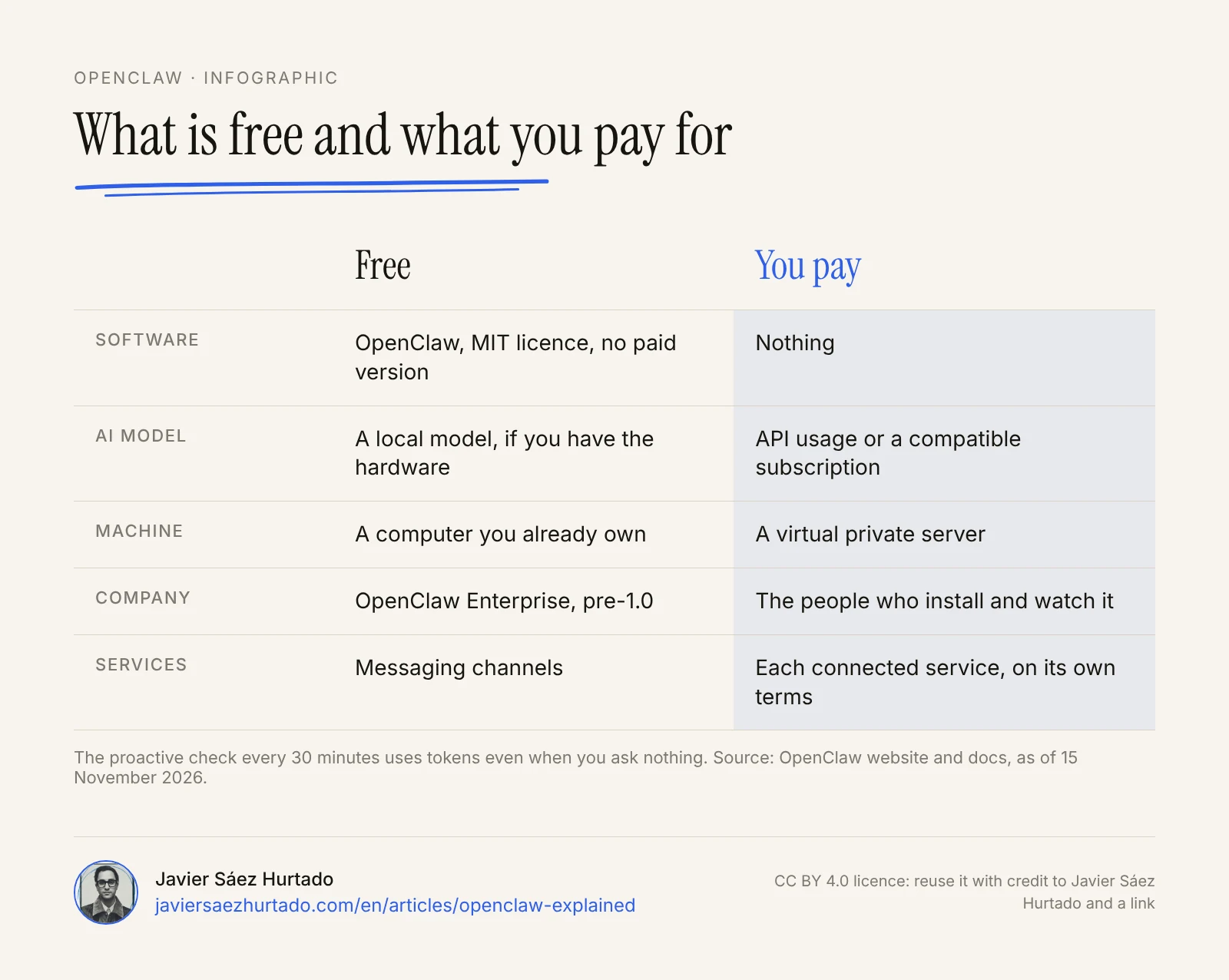
- The AI model. This is the main cost. You can pay per use with an API key, which is what the docs recommend for ongoing use, or use a compatible subscription. According to OpenClaw’s docs, usage from a Claude subscription counts against that subscription’s limits, and OpenAI explicitly supports Codex access from OpenClaw. An agent that works every 30 minutes uses tokens even when you ask it nothing, so it is worth watching spend from day one.
- A local model. With Ollama or LM Studio the model runs on your machine and you do not pay per use, but you need a computer with a good graphics card, and local models tend to fail more on long tasks.
- The machine. If you do not install it on a computer you already own, you need a virtual private server. The docs have guides for several providers; the cost depends on the plan you pick.
- Connected services. Every service you connect has its own terms and costs.
What are OpenClaw’s risks? Is it safe?
OpenClaw’s risks come from its very nature: an agent with broad access to your machine and accounts, extendable with third-party code and reachable through messaging. Its popularity made it one of the first big security problems of agentic AI in 2026:
- Malicious skills. In early February 2026, Koi Security found 341 malicious skills among the 2,857 published on ClawHub, almost all from one campaign that installed password-stealing software on macOS. Bitdefender estimated that around 17% of the skills it analysed were malicious. In June, Unit 42 at Palo Alto Networks documented five more malicious skills that got past the checks of the time; OpenClaw closed the accounts and deleted them.
- Exposed installs. In less than a week at the end of January 2026, installs reachable from the internet went from about 1,000 to more than 21,000, according to Censys. Several researchers showed they leaked API keys and chat histories.
- Serious vulnerabilities. CVE-2026-25253, scored 8.8 out of 10, allowed one-click takeover of an install. It was fixed on 30 January 2026. On 11 September ten more security advisories were published, two of them rated high.
- Sandboxing off. By default, tools run on your machine, not in an isolated environment.
- Credentials on the machine. Keys and session data are stored in files on the machine, so any program that reaches them can read them.
- Prompt injection. A document, an email or a web page can hide instructions the agent takes as orders. There is no complete defence against this kind of attack today.
The response has been mixed. China restricted its use in government bodies, state companies and banks in March 2026. The analyst firm Gartner called it an unacceptable cybersecurity risk for businesses, as The Register reported on 30 September. For its part, the project has strengthened its security a lot: skill scanning with VirusTotal since February and with NVIDIA since June, an openclaw security audit command that checks the configuration, mandatory pairing for anyone who messages it for the first time and the Trail of Bits audit. One of its maintainers put it bluntly months ago: if you do not know how to use the command line, the project is too dangerous to use safely.
My short answer to whether OpenClaw is safe: it can be reasonably safe in the hands of someone who knows how to isolate it, and it is not safe as a default install on the computer where your life lives.
How to use OpenClaw sensibly
The sensible way to use OpenClaw is to treat it like a new hire with access to your systems: minimal permissions, supervision and a separate environment. These are the rules I would apply:
- Install it on a dedicated machine or server, not the computer with your personal or company data.
- Turn on tool sandboxing in Docker or Podman before giving it any real task.
- Never expose the gateway or its panel to the internet, and run
openclaw security auditafter every configuration change. - Keep pairing or an allowlist of contacts, so nobody else can give it orders through messaging.
- Create accounts, keys and a browser profile just for the agent, with the minimum permissions, instead of giving it yours.
- Install only reviewed skills, and read the
SKILL.mdand the scan card before enabling them. - Keep it updated: serious bugs are fixed in new versions, and an old install is the most exposed.
- Require human approval for any irreversible action: payments, sending, deleting or publishing.
OpenClaw vs Claude Cowork and Hermes Agent
OpenClaw is not the only way to have an agent work for you, and choosing well depends on how much control you want and how much risk you can manage.
- Versus Claude Cowork. Cowork is a paid Anthropic product, built into the Claude app, with approvals, company controls and security handled by the vendor. OpenClaw you install and run yourself, with whichever model you want. For people who do not run servers, Cowork is the more cautious choice.
- Versus Hermes Agent. Both are open agents with an MIT licence that you control through messaging. Hermes is developed by a company, Nous Research, focuses on the agent learning and creating its own skills, and has stricter approval modes by default.
- Versus workflow tools such as n8n. n8n is a flow-based automation tool: you define the steps and they always run the same way. OpenClaw decides the steps by itself. For a repetitive process that must be predictable, such as moving form data into a spreadsheet, a workflow tool is more reliable and easier to audit.
What does it mean for companies in Europe?
OpenClaw is free software and can be used in Spain and the European Union with no specific legal restriction. Being legal does not make it suitable for every company: the same data protection and security rules that apply to any software apply here, with the added factor that the agent acts on its own.
In Spain, the data protection agency (AEPD) published a guide on 27 October 2026 for using AI assistants and agents that, without naming OpenClaw, fits it perfectly: the agent prepares and the person approves; grant only the permissions each task needs; require confirmation before sending, sharing, paying or signing up; and keep in mind that the agent may follow hidden instructions. It also reminds people that at work they should only use the assistants their organization has authorized.
For a company, that comes down to three decisions before installing it:
- Personal data. If the agent will touch client or employee data, the company is the controller. A model provider that processes data in the EU with a data processing agreement, or an open model on your own servers, is the safer route.
- Internal approval. Nobody should install OpenClaw on a company machine on their own. If it is used, it should be an approved pilot, with an owner and a separate environment.
- Records. Keep track of what tasks the agent does, with which accounts and who approved them. OpenClaw Enterprise is heading in that direction, but it is still pre-release.
What OpenClaw tells us about agents at work
OpenClaw is the clearest sign of where AI is going: from assistants that answer to agents that work continuously and on their own initiative. We discussed it on Era Exponencial in March 2026 and the conclusion still holds: every company will need an agent strategy, even if it never uses OpenClaw. The big players have followed the same path with more controlled products, such as Claude Cowork, Meta’s Muse or Microsoft Autopilot itself, which is built on OpenClaw.
At Convexify, the AI firm I founded in Andorra, we build agents for companies on a principle OpenClaw illustrates very well by counterexample: an agent’s autonomy grows only with tests on real work, and human approval has to be explicit for anything that cannot be undone. I think it is good news that the project now has a foundation, external audits and a stable release line; that is exactly what it lacked in January. But it does not change the essentials: an agent that wakes up on its own every 30 minutes, with access to your email and your browser, needs clear limits before it needs more capabilities.
I would use it to learn how agents work and for low-risk internal tasks, on a separate machine and with accounts created only for it. I would not let it write to other people on my behalf, move money or touch client data. The useful question is not what an agent can do, but what you would let it do without looking. That answer is what defines a good agent strategy.
Key takeaways
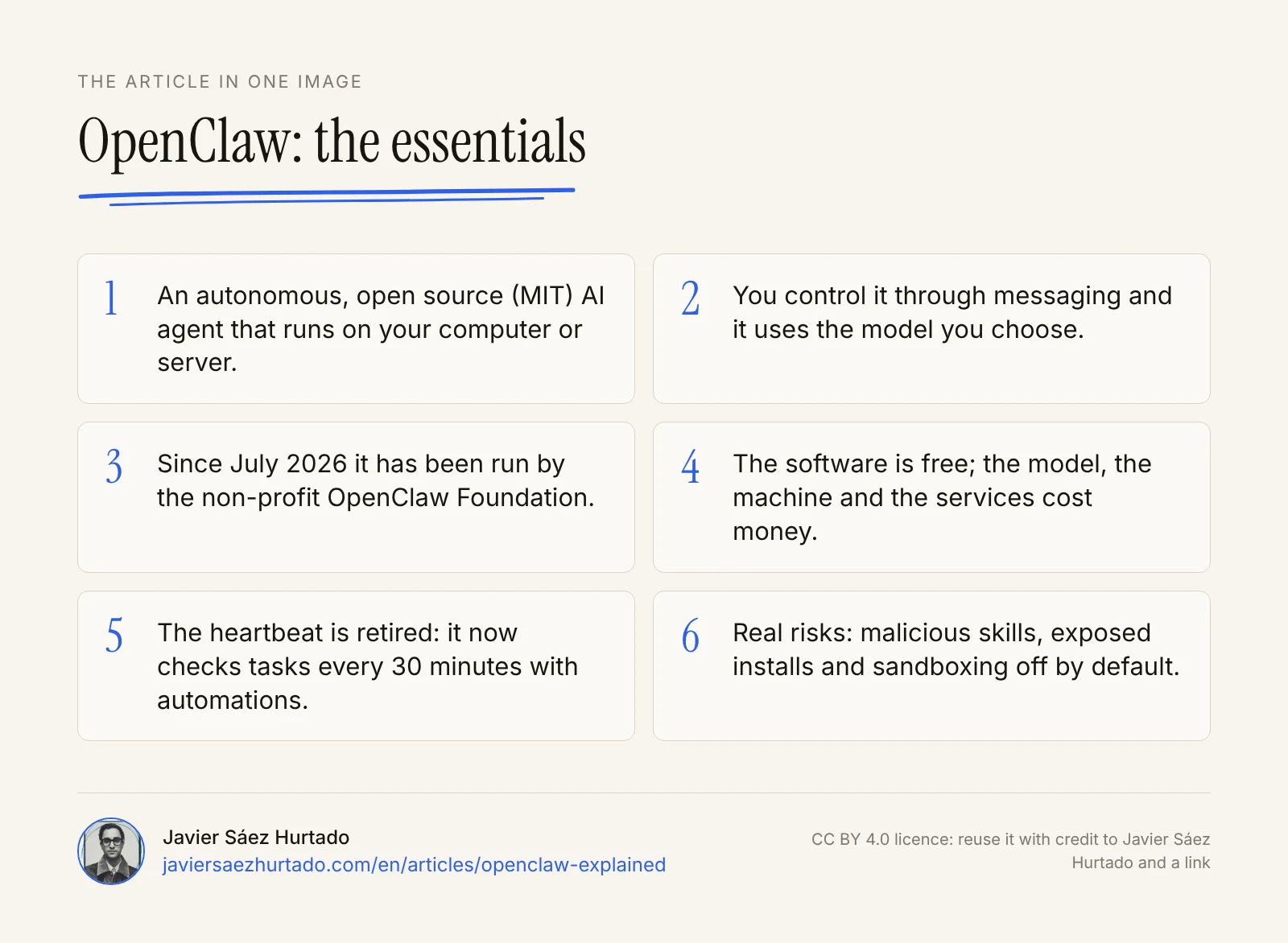
OpenClaw is an autonomous, open source agent that you install on your machine, control through messaging and that acts on its own thanks to its gateway, skills, memory and automations. The software is free, but the model, the machine and the services cost money. Since July it has been run by a foundation, it has passed an external audit and it is safer than in January, but sandboxing is still off by default, and its 2026 history shows that an agent with real access needs minimal permissions, a separate environment and human supervision before it needs more capabilities.
The article in one image
Frequently asked questions
What is OpenClaw?
It is an open source AI agent that you install on your computer or a server and that carries out tasks for you: it manages email and calendar, uses the browser, reads and writes files and runs commands. You control it by messaging it on WhatsApp, Telegram, Slack or other chat apps, and it reasons with the model you choose, such as Claude, GPT or a local model.
Is OpenClaw free?
The software is: it has an MIT licence and, according to its foundation, there is no paid version, no hosted service and no token. But using it costs money: you pay for the AI model (through an API or a compatible subscription), the machine or server you run it on and any third-party services you connect. With a local model, the model cost becomes your own hardware.
Is OpenClaw safe?
It can be used reasonably safely, but it is not safe by default. In 2026 it has had malicious skills in its marketplace, tens of thousands of installs exposed to the internet and serious vulnerabilities, and tool sandboxing is off by default. The analyst firm Gartner called it an unacceptable cybersecurity risk for businesses. Run it on a dedicated machine, never expose it to the internet and require human approval for anything irreversible.
How do you install OpenClaw?
It runs on macOS, Windows and Linux. There are desktop apps, a one-line installer, npm packages, Docker images and guides for private servers. It needs Node 24 or 26, which the installers add if it is missing. Before installing it, read the security guide in its documentation and do it on a dedicated computer or server, not the one with your data.
What is the difference between OpenClaw and Claude Cowork?
OpenClaw is an open source agent that you install and run yourself, control through messaging and use with the model you choose. Claude Cowork is a paid Anthropic product, built into the Claude app, with approvals, company controls and security handled by the vendor. OpenClaw gives more control; Cowork means less work and less risk for people who do not run servers.
What is the difference between OpenClaw and Hermes Agent?
Both are open source agents with an MIT licence that you control through messaging and that use skills. OpenClaw is run by a non-profit foundation and stands out for its large ecosystem of channels and skills. Hermes Agent is developed by a company, Nous Research, focuses on the agent learning and creating its own skills, and has a paid offering for businesses.
Sources
- OpenClaw, official website (accessed 15 Nov 2026)
- OpenClaw, GitHub repository (accessed 15 Nov 2026)
- OpenClaw, release 2026.11.3 (10 Nov 2026)
- OpenClaw docs, what OpenClaw is and how it is funded (accessed 15 Nov 2026)
- OpenClaw docs, Heartbeat and proactive check (accessed 15 Nov 2026)
- OpenClaw docs, gateway security (accessed 15 Nov 2026)
- OpenClaw docs, sandboxing (accessed 15 Nov 2026)
- OpenClaw docs, installation (accessed 15 Nov 2026)
- OpenClaw docs, Anthropic provider (accessed 15 Nov 2026)
- OpenClaw, Introducing the OpenClaw Foundation (8 Jul 2026)
- OpenClaw, Trail of Bits engagement recap (21 Sep 2026)
- OpenClaw, Microsoft Autopilot is built on OpenClaw (25 Sep 2026)
- OpenClaw, Introducing OpenClaw Enterprise (29 Sep 2026)
- Wikipedia, OpenClaw
- CNBC, Jensen Huang on OpenClaw (5 Mar 2026)
- Koi Security, ClawHavoc: 341 malicious skills (Feb 2026)
- Censys, exposed OpenClaw instances (31 Jan 2026)
- Unit 42 (Palo Alto Networks), OpenClaw’s Skill Marketplace and the Emerging AI Supply Chain Threat (23 Jun 2026)
- The Register, OpenClaw slips on a suit to evade widespread business bans (30 Sep 2026)
- AEPD (Spanish data protection agency), AI assistants and agents: a guide for users (27 Oct 2026, in Spanish)