AI study guide · Module 3. Tools
Lesson 2 of 5 in English
Claude vs ChatGPT: differences and which to pick
Claude vs ChatGPT is the big AI comparison, and the short answer is that neither wins at everything. Both are assistants built on a language model with tools around it. ChatGPT, from OpenAI, is the most complete app: it makes images, talks over video and has an agent on every plan, but its free plan shows ads in the US. Claude, from Anthropic, stands out at reading long documents, writing and coding, and has no ads. Both main paid plans cost $20 a month. Pick by what you do, and test both with a task of your own.
What is the difference between Claude and ChatGPT?
Claude and ChatGPT are two AI assistants that, at the basic level, do the same thing: you talk to them in writing or by voice, and they answer with text, tables, code or files. They search the web, read your documents and can do tasks for you. The difference between Claude and ChatGPT is not so much what they can do as where each one has grown: ChatGPT wants to be the app for everything, including images and video calls; Claude has focused on work with text, long documents and code.
- ChatGPT
- OpenAI’s assistant, launched on 30 November 2022. It runs on the GPT models (today, the GPT-6 family) and brings together chat, Work (an agent that does whole tasks) and Codex (coding).
- Claude
- Anthropic’s assistant, launched in March 2023. It runs on its own family of models (Haiku, Sonnet, Opus and, above them, Fable) and brings together chat, Artifacts, the agent that used to be called Cowork, and Claude Code.
- Anthropic
- The company that makes Claude. It was founded in 2021 by seven people who left OpenAI, including siblings Dario and Daniela Amodei, with AI safety as its banner.
Inside, they work the same way. The part that writes is a large language model that predicts text piece by piece, tuned to behave as an assistant, and around it there are tools: web search, file reading, code execution, memory and agents. That is also why both make mistakes in the same way: they write the most likely text, not checked text.
What changes is the product and the company behind it. ChatGPT is by far the most used: OpenAI spoke of 900 million weekly users in February 2026, which is why almost everyone tries it first. Claude has far fewer users, but it is widely used at work and for coding, and it has a clear identity: Anthropic puts AI safety at the center of its message, and in February 2026 it promised that Claude will not have ads, just as ChatGPT started testing them.
Claude vs ChatGPT at a glance
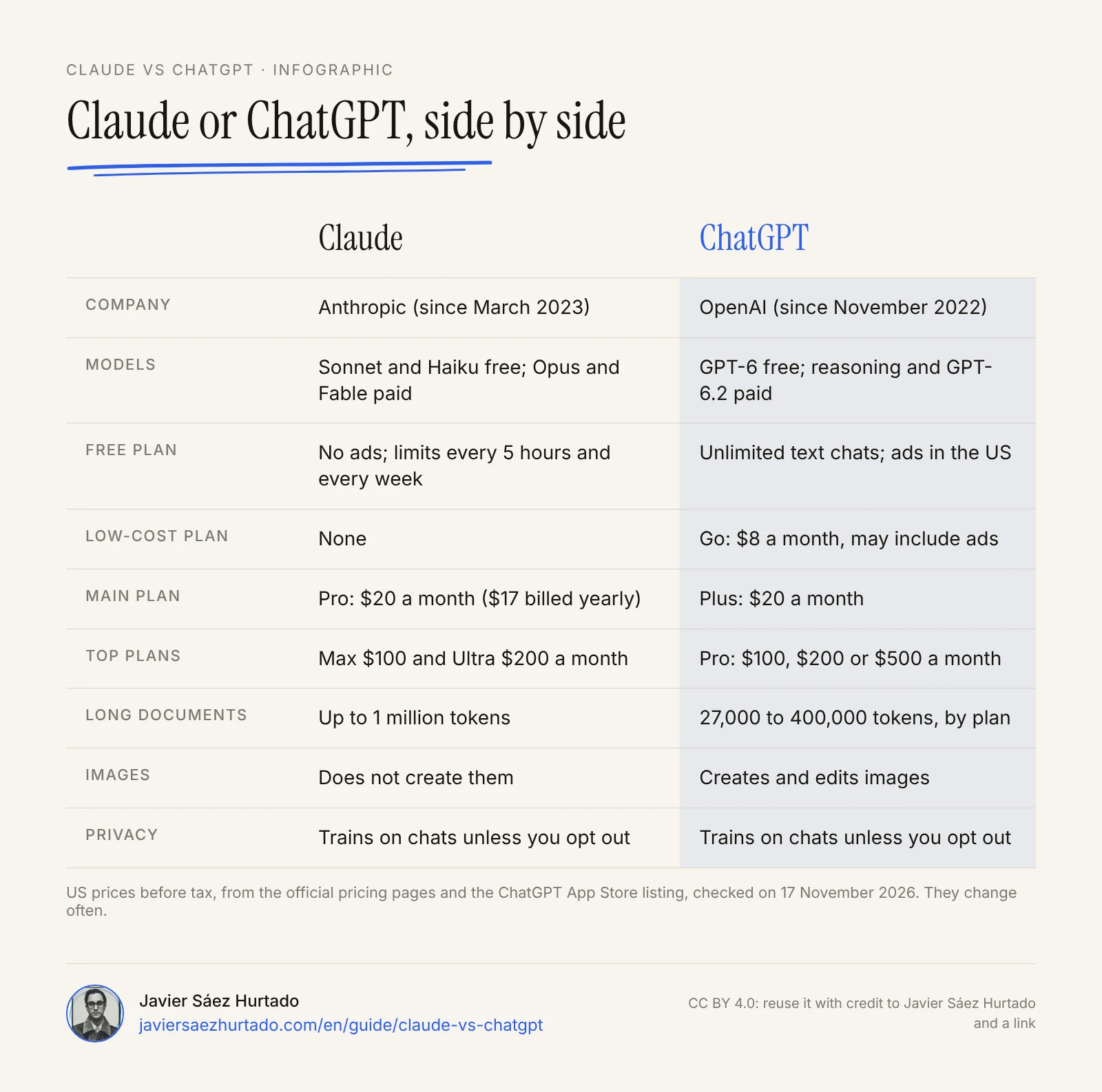
This is the side-by-side comparison, with data from the official Anthropic and OpenAI pages, checked from the US on 17 November 2026. It changes often: in the last month both companies have released new models and changed their plans. On the day I checked, Claude had added a new top plan, Ultra, and OpenAI had just released GPT-6.2.
Claude and ChatGPT, row by row
Official data checked from the US on 17 November 2026
| Feature | Claude | ChatGPT |
|---|---|---|
| Company | Anthropic | OpenAI |
| Since | March 2023 | 30 November 2022 |
| Models | Free: Sonnet and Haiku. Paid: Opus and, with limits, Fable | Free: GPT-6. Paid: GPT-6 reasoning and, in Work and Codex, GPT-6.2 |
| Where it works | Web, iPhone, Android and desktop (Mac and Windows) | Web, iPhone, Android and desktop (Mac and Windows) |
| Free plan | No ads; limits every 5 hours and every week | Unlimited text chats; ads in the US |
| Low-cost plan | None | Go: $8 a month; may include ads |
| Main plan | Pro: $20 a month, or $17 billed yearly | Plus: $20 a month |
| Top plans | Max: $100 a month. Ultra: $200 a month | Pro: $100, $200 or $500 a month |
| Long documents | Up to 1 million tokens of context, by model | From 27,000 tokens (free, fast mode) to 400,000 (Pro, reasoning) |
| Images | Does not create them; makes charts and designs with code | Creates and edits images |
| Agent that works for you | Built into Claude (formerly Cowork), from Pro | Work, on every plan (free only in the desktop app) |
| Coding | Claude Code, from Pro | Codex, also free with limits |
| Trains on your chats | Yes, unless you turn it off | Yes, unless you turn it off |
| Chat with no history | Incognito chat: deleted after 30 days | Temporary chat: deleted after 30 days |
| Minimum age | 18 | 13, with a parent’s permission until 18 |
Which is better, Claude or ChatGPT?
Neither is better at everything. For what most people do (an email, a summary, an explanation, ideas for a presentation), Claude and ChatGPT both do well, at a similar level. The differences show up at the edges: huge documents, serious coding, long tasks, or things one does and the other does not, like creating images.
There are three reasons to distrust any overall winner:
- The models change almost every month. OpenAI released GPT-6 Astra on 3 September 2026 and GPT-6.2 on 17 November. Anthropic released Opus 5.5 and Sonnet 5.5 at the end of September, and above them it has Fable, its most capable and slowest model, updated to Fable 5.2 on 9 November. A comparison from the spring describes other models.
- Each company publishes its own tests. And each one picks the tests it wins. In the table Google published when it launched Gemini 4 Argon, its model sits behind Claude Opus 5.5 at coding in the terminal and behind GPT-6 Astra at computer use.
- Each plan gives you a different model. Free Claude uses Sonnet and Haiku, not Opus or Fable; free ChatGPT is not GPT-6.2 Astra. Comparing one’s free plan with the other’s paid plan tells you nothing.
What does stay stable is the character of each one, and most people who use both agree on it. Claude tends to write in a more natural, less template-like tone, follows long instructions better and handles very long documents without losing the thread. ChatGPT is faster, does more things inside the same app and, on its free plan, lets you write much more before it stops you. That is why the rest of this lesson compares the product: what each plan includes, what each one is for and what each company does with your data.
Which is better for free?
It depends on what matters most to you, because the two free plans go in different directions: ChatGPT lets you write more and do more things, but with ads; Claude limits your use more, but has no ads and gives you some features that ChatGPT keeps for paid plans.
Claude for free. It works on the web, on your phone and on desktop with the Sonnet and Haiku models. It includes memory across chats, web search, file creation and code execution, connectors to your apps, skills, Artifacts, Claude Design, Slides and Docs, voice mode and up to five projects. The limit is usage: the pricing page says “limited usage every 5 hours and every week”, and how much fits depends on demand, on the model and on how long your chats and files are. It does not include Opus, Claude Code or Research. And it has no ads: Anthropic promised on 4 February 2026 that Claude will stay ad-free.
ChatGPT for free. Unlimited text chats with GPT-6 (with guardrails against abuse) and limited use of uploads, image creation, voice, deep research, memory, Codex and Work, the last one only in the desktop app. In exchange, ChatGPT has shown ads on its Free and Go plans in the US since 9 February 2026. OpenAI says the ads do not change the answers; I explain how they are chosen in the article on ChatGPT ads.
In practice:
- If you write a lot every day and the ads do not bother you, free ChatGPT gives you more room.
- If you work with long documents or do not want ads, start with Claude, knowing that on a busy day you will have to wait for the limit to reset.
- If you need images, ChatGPT; Claude does not create them.
Claude Pro vs ChatGPT Plus: prices and limits in the US
In the US, the two main plans cost the same: $20 a month for Claude Pro and $20 for ChatGPT Plus. Claude Pro drops to $17 a month if you pay for a year up front ($200). What changes is what comes with each one and how usage is measured.
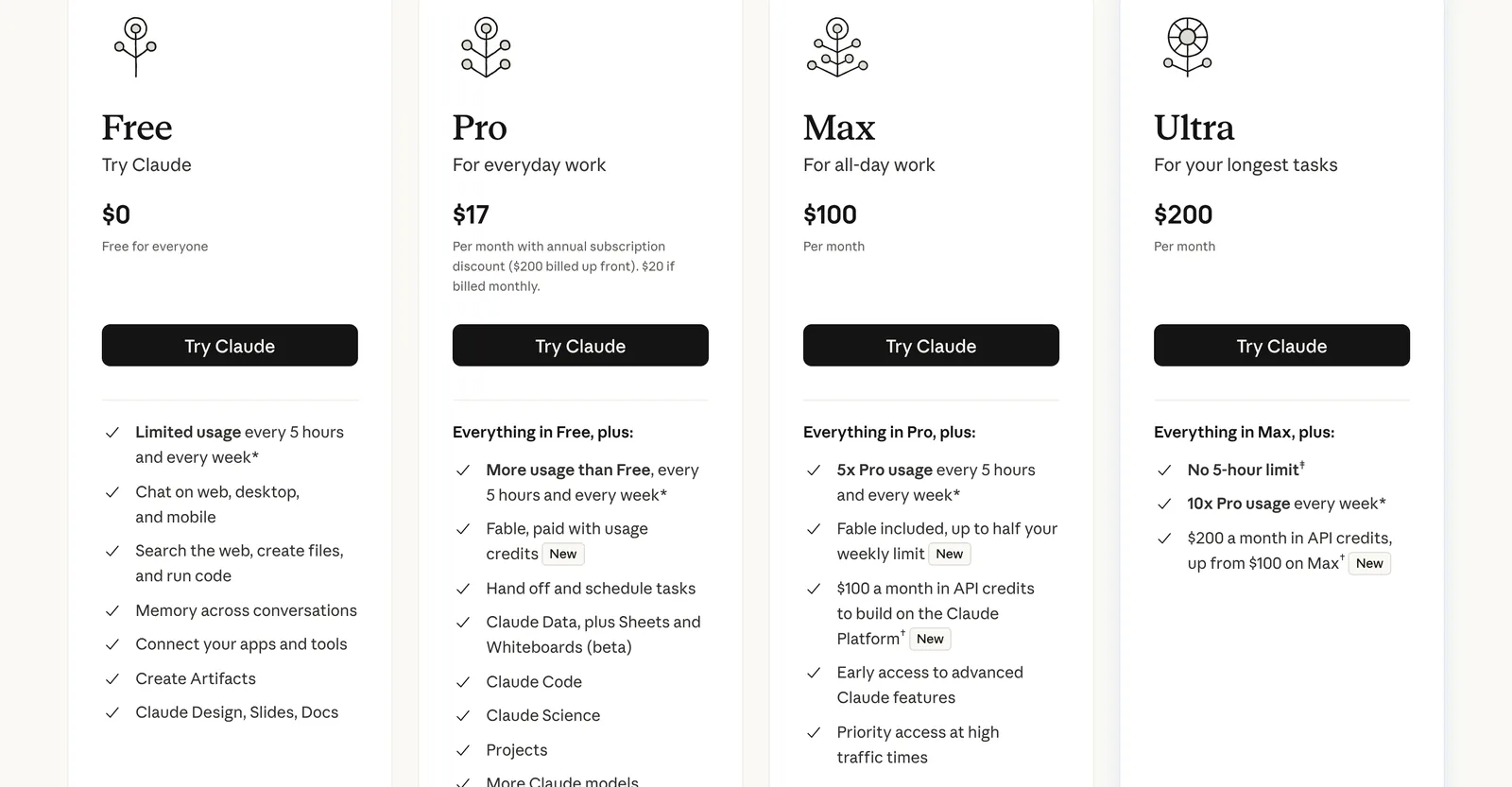
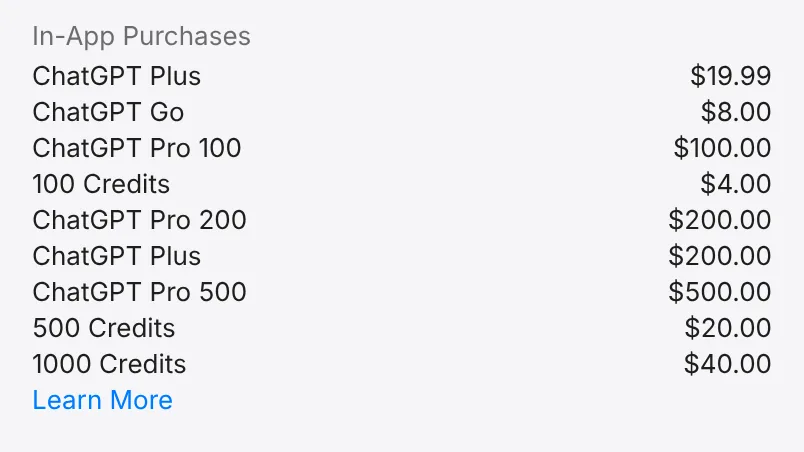
OpenAI’s pricing page loads the price of each plan for your region, and on 17 November it did not show the amounts to our logged-out browser, only the plans and what each adds. The prices are clear in the ChatGPT app on the US App Store: Go $8, Plus $19.99, and Pro in three tiers of $100, $200 and $500 a month. On the web, Plus is $20.
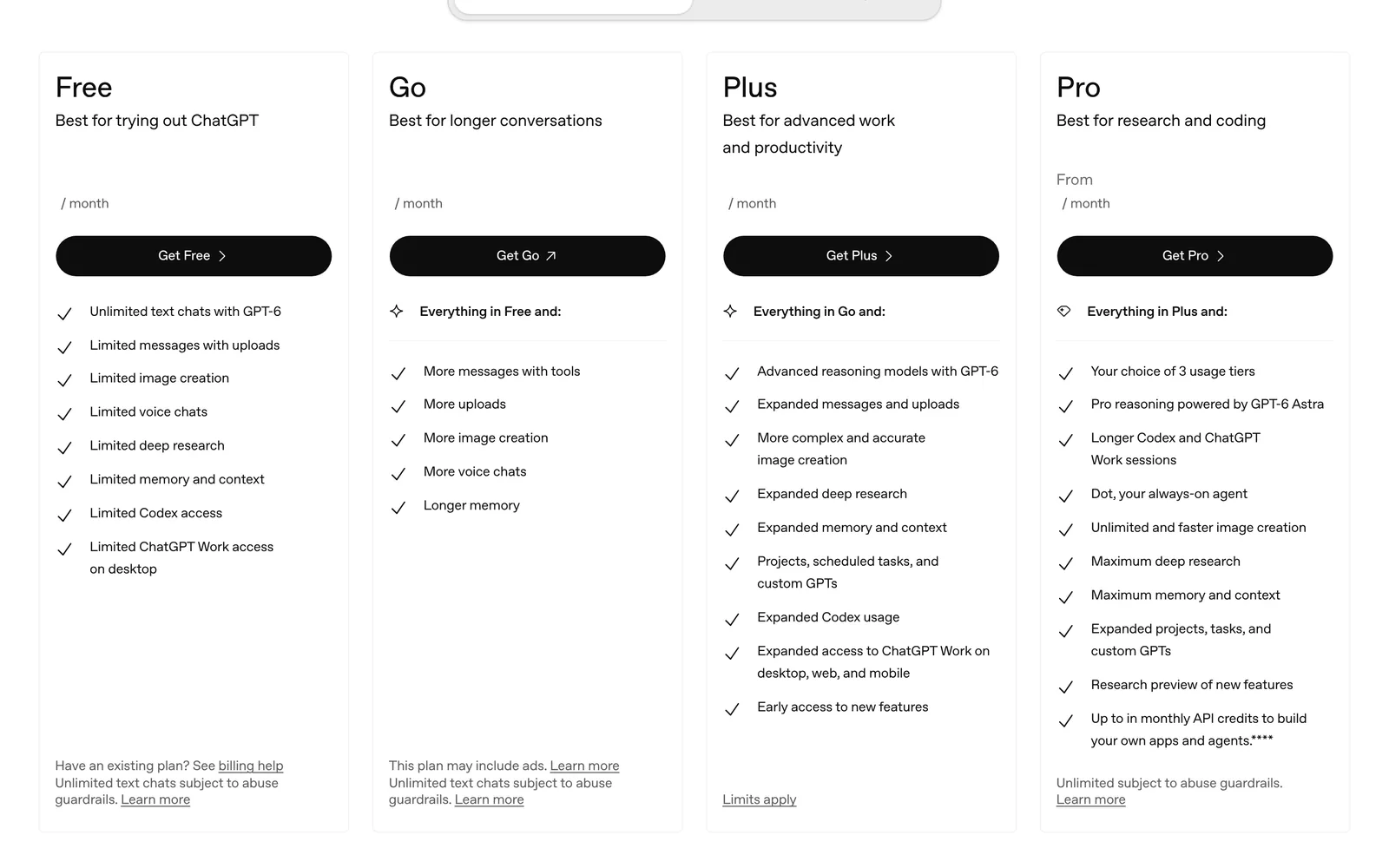
| Plan | Claude | ChatGPT |
|---|---|---|
| Free | $0; Sonnet and Haiku; no ads | $0; GPT-6; ads in the US |
| Low cost | None | Go, $8 a month; may include ads |
| Main | Pro, $20 a month ($17 billed yearly): Opus, Claude Code, Research, Claude in Chrome and Microsoft 365 | Plus, $20 a month: GPT-6 reasoning, more images, projects, scheduled tasks and Work on web and mobile too |
| Top | Max, $100 a month: 5x Pro usage. Ultra, $200 a month: no 5-hour limit and 10x Pro usage per week | Pro, $100, $200 or $500 a month: Pro reasoning with GPT-6 Astra, longer Work and Codex sessions and Dot, the always-on agent |
Prices shown on 17 November 2026 by claude.com/pricing (before tax) and by the ChatGPT listing on the US App Store. Check the total on the checkout page before you subscribe.
Claude Pro or ChatGPT Plus? The most practical difference is in the limits. Claude measures use in five-hour windows and also with a weekly limit, and everything you do (chat, agent and Claude Code) comes out of the same pool. If you run out, you wait, move up to Max or Ultra, or turn on usage credits, which are billed at API prices. Claude’s most capable model, Fable, is paid with usage credits on Pro and included up to half your weekly limit on Max and Ultra. ChatGPT Plus does not limit text chats, but it does limit tools, reasoning models and Work. And from December, ChatGPT and Codex share one usage allowance, which I explain in ChatGPT and Codex usage limits.
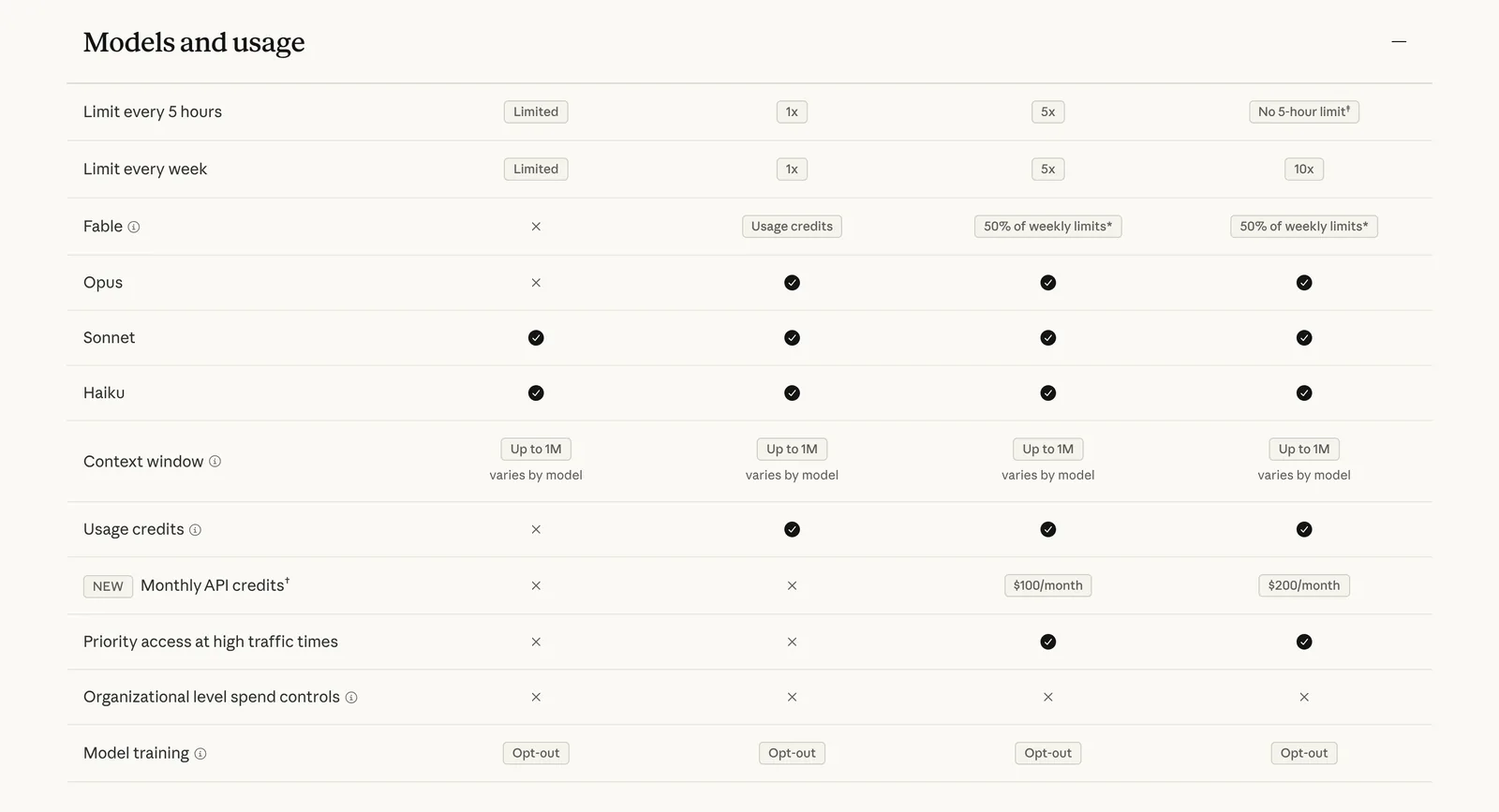
With that in hand, the rule is simple. If you code, work with long reports and contracts, or want Claude inside Excel, Word and PowerPoint, Claude Pro. If you want one app for everything, with images, voice with video, scheduled tasks and an agent on your phone, ChatGPT Plus. And if you use AI several hours a day to code, look at Max before you get frustrated with Pro’s limits.
What each one is best for: writing, coding, images and agents
To choose, think about the tasks you repeat. These are the cases where one of the two usually fits better:
- Careful writing. Claude has a well-earned reputation for writing more naturally and following a long style guide better. ChatGPT writes well and faster, with a slightly stronger pull toward stock phrases. In both, the difference comes from how you ask: give the context, the audience, an example and the format you want.
- Long documents. Claude has a clear edge here: its models accept up to 1 million tokens of context, roughly 1,500 pages, on every plan. In ChatGPT, the space depends on the plan and the mode: fast mode on the free plan stops at about 12 pages of your own text, and Plus reasoning reaches about 320.
- Coding. Claude Code is one of the most used coding agents, and Claude models rank near the top of coding tests. ChatGPT has Codex, which is also on the free plan with limits. If you start without paying, Codex; if you code every day, try both.
- Images, voice and video. ChatGPT creates and edits images and has voice with video. Claude does not create images: it makes charts, diagrams, slides and mockups with code, with Artifacts and with Claude Design, Slides and Docs.
- Long tasks done for you. Both have an agent. In ChatGPT it is called Work and it is on every plan; in Claude, the agent that used to be called Cowork has been part of the app since 16 September 2026, from Pro up (“Hand off and schedule tasks” on the pricing page). Both ask permission before anything sensitive. Anthropic’s proactive agent, Claude Duet, is another step in the same direction.
- Excel, Word and PowerPoint. Claude Pro includes Claude for Microsoft 365 and Outlook; ChatGPT has plugins for Excel, Word, PowerPoint and Google Sheets, limited on the free plan.
- Instructions you repeat. Both have projects and skills. Skills use the same format in both, so what you write for one works in the other: I explain how to build one in Claude Skills.
- Finding current information. Both search the web and have deep research (Research in Claude, paid only). In both, open the sources: sometimes they summarize badly.
If your doubt is between ChatGPT and Google’s assistant, the comparison is in ChatGPT vs Gemini.
Try it yourself: the same task in Claude and ChatGPT
The comparison that matters most is the one you run with a task of your own. Here is an example. Dana runs a small online ceramics shop, and a supplier has sent her a 24-page distribution agreement. She wanted to know whether to pay for Claude Pro or ChatGPT Plus, and instead of reading rankings she ran this test in one afternoon, on the free plans.
- Write the task once. She wrote the same message for both, word for word: “I am attaching a distribution agreement. I am the distributor. Make a table of the 8 clauses that bind me the most or could cost me money: clause number, what it says in one sentence, risk for me (high, medium or low) and what I would ask to change. Then write a short, friendly email to the supplier asking for those changes. If anything in the text is unclear, tell me instead of guessing.”
- Remove what should not go out. Before uploading the PDF, she blacked out names, tax IDs and bank details. A contract with other people’s data does not go into a personal account of any assistant.
- Run it clean. She opened an incognito chat in Claude (the ghost icon) and a temporary chat in ChatGPT, so that what each one remembers about her would not affect the answer, and attached the same file to both.
- Check it with the contract in front of you. She opened the PDF and checked every row: does that clause exist? Does it say that? Is an important one missing, like exclusivity or penalties?
- Ask for a second pass. She told both the same thing: “You left out clause 14, which sets a penalty. Review the table and the email.” This shows how each one corrects itself and whether it makes something up to fit.
- Score and decide. She used this template, 0 to 2 points per item:
| Item | What you check | Points |
|---|---|---|
| Accuracy | Every clause exists and says what the table says | 0 to 2 |
| What it misses | No important clause is missing | 0 to 2 |
| Honesty | It flags what is unclear instead of inventing it | 0 to 2 |
| You would send it as is, or almost | 0 to 2 | |
| Corrections | How many messages it takes to get it right | 0 to 2 |
Do not expect one winner on every row. In a test like this, the usual result is that one makes the better table and the other writes the email more to your taste, and the real difference shows up when you check the clauses against the text. Two things decided it for Dana: which one needed fewer corrections, and which one cut her off first because of usage limits. With another task the answer would have been different, which is why it is worth running your own test.
If you then decide to switch, you do not have to start from zero. Claude can import the memory of another assistant: it gives you a prompt to paste into ChatGPT, ChatGPT returns a summary of what it knows about you, and you paste that into Claude. Read it first and delete what you do not want it to remember. To go the other way, ask Claude for a similar summary and paste it into ChatGPT, asking it to remember it.
Which is safer? Data, ads and age
Both can be used safely if you know what they keep and you set them up. Both can use your chats to train their models unless you change a setting, and in both you can turn it off. What changes is how long they keep data, the ads and the minimum age:
| Topic | Claude | ChatGPT |
|---|---|---|
| The key setting | Help improve Claude, in Settings, Privacy | Improve the model for everyone, in Settings, Data controls |
| How long chats are kept | Up to 5 years if you allow training; 30 days if not | Until you delete the chat |
| No history | Incognito chat: no training, no memory, deleted after 30 days | Temporary chat: no training, no memories, deleted after 30 days |
| Ads | None; public promise of 4 February 2026 | On Free and Go in the US since 9 February 2026 |
| Minimum age | 18 | 13, with a parent’s permission until 18 |
| Work accounts | Team, Enterprise and API: no training by default | Business and Enterprise: no training by default |
Three details worth knowing. First, Anthropic’s change is recent. Until 2025, Claude did not train on consumer chats; since its terms update of 28 August 2025, it does if you allow it, and then keeps them up to five years. If you signed up after that, check what you chose.
Second, the ads. OpenAI says ChatGPT’s ads do not change the answers, but they are picked based on your conversation and, if personalization is on, also on your past chats and your memory. You can limit this in the ad controls, pay for a plan without ads (Plus or Pro) or use temporary chats, which do not show them.
Third, the agents. Both ask for approval before sending, buying or deleting, but an agent with access to your email or your browser can read instructions hidden in a web page or a message. Give permissions one at a time, start with test accounts and do not approve out of habit.
The rule for both: no passwords, no ID numbers, no other people’s health data and no customer information in a personal account.
Common mistakes when choosing between Claude and ChatGPT
- Choosing by a benchmark table. Each company publishes its own, they measure narrow things and they change with every model. Your test with a real task says more.
- Comparing different plans. Free Claude against paid ChatGPT, or the other way around. Always compare the same level.
- Judging Claude by a bad day of limits. The free plan cuts off sooner; if it stopped you halfway through a task, it is not worse, your usage window ran out. Try it calmly, or try Pro for a month.
- Asking Claude for an image. It does not create them, and it may offer a drawing made with code that is not what you wanted. For images, ChatGPT or Gemini.
- Trusting an old comparison. One from the spring describes models and plans that no longer exist. Check the date before you read.
- Paying for both just in case. For almost everyone, one paid plan is enough, plus the other one free to double-check.
- Pasting work data into a personal account. If your company has a work account with one of them, use that.
My take
I use both every day, for different things, and I do not think the question of which is better has an answer that lasts more than a few months. Anthropic and OpenAI overtake each other every few weeks. So I would not choose by this month’s benchmark table, but by what changes less: the kind of work I do, how each one measures usage and what each company does with my data.
If my work were mostly reading and writing long documents, or coding, I would start with Claude. If I wanted one app for everything, with images and voice, and to write a lot without worrying about limits, I would start with ChatGPT. In both cases I would do the same on day one: check the training setting, use the no-history chat for anything sensitive, paste nothing that is not mine and check the facts that matter at the source.
With agents, my rule is the same for both: neither Work nor Claude’s agent should do anything that cannot be undone (send an email, pay, delete) without me looking first.
Disclosure: Convexify, the firm I founded, is part of the OpenAI Select Partner program, and I prepare this guide with the help of Claude and ChatGPT. This comparison comes from Anthropic’s and OpenAI’s public documentation and the linked sources, and I review it when their plans change.
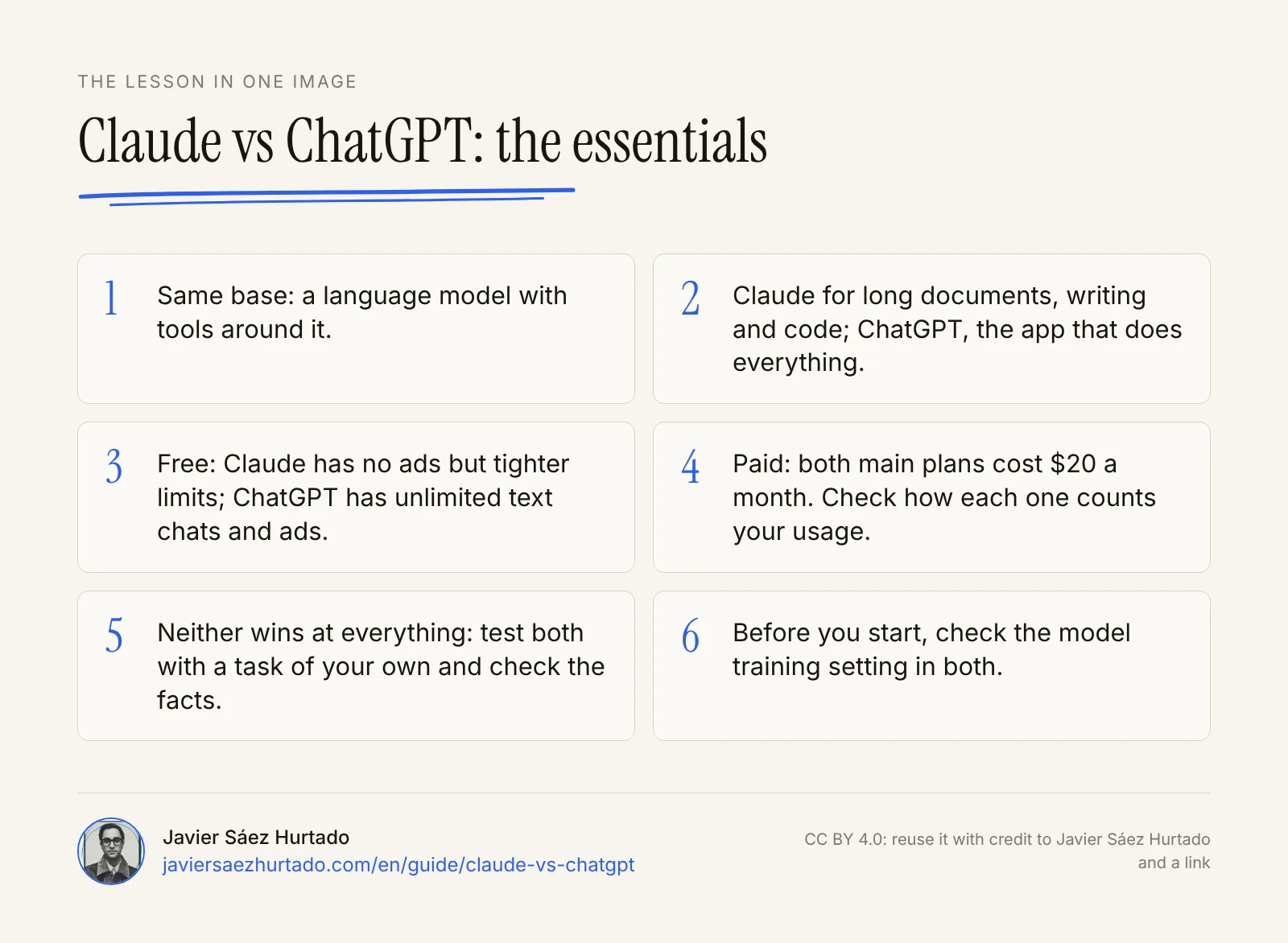
The lesson in one image
FAQ
Which is better, Claude or ChatGPT?
Neither is better at everything. Claude tends to do better with long documents, careful writing and coding; ChatGPT is the more complete app (images, voice with video, an agent on every plan, plugins) and its free plan allows more text chats. For everyday tasks both do well. The most reliable way to choose is to test both with a task of your own and check the facts.
Is Claude better than ChatGPT for coding?
For many developers, yes: Claude Code is one of the most used coding agents, and Claude models rank near the top of the coding tests the labs publish. ChatGPT has Codex, which is also on its free plan with limits. Claude Code is not on the free Claude plan: you need Pro ($20 a month) or higher.
Is Claude free?
Yes. With an account you can use Claude for free on the web, on your phone and on desktop, with no ads, with the Sonnet and Haiku models, memory, web search, connectors, Artifacts, skills and up to five projects. Use is limited every five hours and every week, and the free plan does not include Opus, Claude Code or Research.
Which is better, Claude Pro or ChatGPT Plus?
Both cost $20 a month in the US, and Claude Pro drops to $17 a month if you pay for a year. Claude Pro adds Opus, Claude Code, Research, Claude in Chrome and Microsoft 365, and more use than the free plan. ChatGPT Plus adds the GPT-6 reasoning models, more images, projects, scheduled tasks and Work on desktop, web and mobile. For coding and long documents, Pro; for one app that does it all, Plus.
How much does ChatGPT cost compared with Claude?
In the US, as of 17 November 2026: ChatGPT Free is $0 (with ads), Go is $8 a month (may include ads), Plus is $20 and Pro is $100, $200 or $500 depending on the usage tier. Claude Free is $0, Pro is $20 a month ($17 billed yearly), Max is $100 and Ultra is $200. Claude prices are before tax.
Can Claude create images like ChatGPT?
Not like ChatGPT. As of November 2026, Claude does not create photos or illustrations from a description, and its pricing page does not list image generation. It does make charts, diagrams, slides and mockups with code, with Artifacts and with Claude Design, Slides and Docs. If you need images, use ChatGPT or Gemini.
Which is safer, Claude or ChatGPT?
Both can be safe if you set them up. Both can train on your chats unless you turn it off; Claude keeps them up to five years if you allow it and 30 days if you do not. Claude has no ads and requires users to be 18; ChatGPT shows ads on its Free and Go plans and allows users from 13 with a parent’s permission. In both, keep out passwords, health data and customer data from a personal account.
How do I switch from ChatGPT to Claude without losing my context?
Claude can import the memory of another assistant on every plan. You copy the prompt Claude gives you, paste it into ChatGPT, which returns a summary of what it knows about you, and paste that summary into Claude. Read it first and delete what you do not want Claude to remember. Old chats do not move over: export the ones you want to keep.
Can I use Claude and ChatGPT at the same time?
Yes, and it is a good idea while you decide: both have a free plan. Give both the same task and compare. In the long run, the practical choice is to pay for one (if you pay at all) and use the other for free to double-check important answers.
Sources
- Anthropic, Introducing Claude (14 Mar 2023)
- OpenAI, Introducing ChatGPT (30 Nov 2022)
- Claude, Plans and pricing (checked from the US on 17 Nov 2026)
- ChatGPT, Pricing (checked from the US on 17 Nov 2026)
- Apple App Store (US), ChatGPT: in-app purchases (checked on 17 Nov 2026)
- Claude Docs, Models overview
- Claude, Claude Cowork and chat are now one Claude (16 Sep 2026)
- TechCrunch, ChatGPT reaches 900M weekly active users (27 Feb 2026)
- OpenAI, GPT-6 Astra (3 Sep 2026)
- Google, Gemini 4 Argon is now available in the Gemini app (13 Oct 2026)
- Anthropic, Claude is a space to think (4 Feb 2026)
- Anthropic, Updates to our consumer terms (28 Aug 2025)
- Claude Help Center, About free Claude usage
- Claude Help Center, Using incognito chats
- Anthropic, Consumer Terms of Service
- OpenAI Help Center, Data controls FAQ
- OpenAI Help Center, Is there an age requirement to use OpenAI’s services?
- Tom’s Guide, You can move your ChatGPT memory to Claude in 60 seconds (4 Mar 2026)